Online Controller Trigger Test Tool | Check L2/R2 and LT/RT Pressure Sensitivity

Your trigger should read 0.00 at rest and 1.00 at full press. Anything outside that range this tool tells you exactly what's wrong.

It measures analog pressure from 0.00 to 1.00 in real time, detects trigger drift, max travel loss, linearity jumps, and left/right asymmetry.

CONNECT CONTROLLER
PRESS ANY BUTTON TO ACTIVATE
L2 / LT
0.00
R2 / RT
0.00
DIAGNOSTIC_COREREADY
What Does a Trigger Test Check?

A trigger test reads the analog pressure value your controller sends to the browser via the Gamepad API a float from 0.00 to 1.00. It measures max travel, resting offset, value linearity, and asymmetry giving you a complete picture of trigger health in one test session.


How to Run the Trigger Test

STEP 01

Connect via USB First

Bluetooth adds idle noise. USB gives the cleanest baseline. Connect, then press any button to wake the controller.

STEP 02

Click the Page

Browser needs active tab focus before the API fires. Click once anywhere on the page before starting.

STEP 03

Calibrate Neutral

Take fingers off triggers. Press Calibrate Neutral to record resting values and remove hardware noise.

STEP 04

Press Each Trigger Slowly

Squeeze L2/R2 slowly not a snap. Confirm max value reaches 0.95–1.00. Test separately, then compare L2 vs R2 asymmetry tells you which side is more worn.

Reading Your Results What Your Max Value Means

The most important number is your max value at full press. It should reach 0.95 or above for competitive performance.

Max Value Rating What It Means Action
0.95 – 1.00 Healthy Full travel registering correctly No action needed
0.90 – 0.94 Minor Wear Slight degradation still usable Monitor retest in 30 days
0.85 – 0.89 Wear Warning Precision affected in racing and sims Clean contacts plan repair
Below 0.85 Replace Significant hardware wear Repair or replace trigger
Trigger Drift Resting value above 0.05 when not touching the trigger indicates drift. Use Calibrate Neutral or add a small trigger deadzone in game settings.
Left vs Right Asymmetry If L2 reaches 1.00 but R2 only reaches 0.90 your right trigger is more worn. The lower-value side needs attention first to maintain balance.

Trigger Problem Diagnosis Table

Use this diagnostic guide to identify if your trigger hardware is failing or if it simply needs a software calibration.

Symptom Observed Technical Diagnosis Recommended Fix
Resting value above 0.05 Trigger Drift / Weak Spring CALIBRATE NEUTRAL; INCREASE DEADZONE
Max value below 0.95 Sensor Wear / Pad Thinning CLEAN CONTACTS; REPLACE RUBBER PAD
Values "jump" or flicker Dirty Potentiometer Track USE CONTACT CLEANER (IPA)
Different L2 vs R2 Max Asymmetric Hardware Wear RECALIBRATE MAX LIMITS
Press vs Release Mismatch Trigger Hysteresis (Friction) LUBRICATE HINGE; CLEAN SENSOR
Stuck at 1.00 (Constant) Mechanical Jam / Broken Spring CHECK RETURN SPRING; REMOVE DEBRIS

Controller Compatibility & Tech Specs

Not every trigger is designed to be pressure-sensitive. Check your device's native capabilities below.

Controller / Device Trigger Type Range Key Technology
PS5 DualSense / EdgeAnalog0.00 – 1.00Adaptive Resistance Motors
Xbox Series / Elite 2Analog0.00 – 1.00Hall Effect / Impulse Haptics
Steam Deck (All Models)Analog0.00 – 1.00L2/R2 Full Pressure Range
8BitDo Pro 2 / UltimateAnalog0.00 – 1.00Customizable Hall Effect
Razer Wolverine V2Analog0.00 – 1.00Hyper-Response Hair Triggers
Nintendo Switch ProDigital0 or 1Binary Micro-switch
Switch Joy-ConsDigital0 or 1Membrane Click
Generic / Mobile PadsDigital0 or 1Basic Input Only

⚠️ Important: The "Digital" Confusion

If you are using a Nintendo Switch Pro Controller or Joy-Cons, they will only show 0 (off) or 1 (on). This is not a hardware fault. These devices use digital switches that lack the sensors required to measure pressure. For games like racing sims on PC, an Xbox or PlayStation controller is recommended for throttle control.

What is the Difference Between Controller Haptics and Analog Pressure?

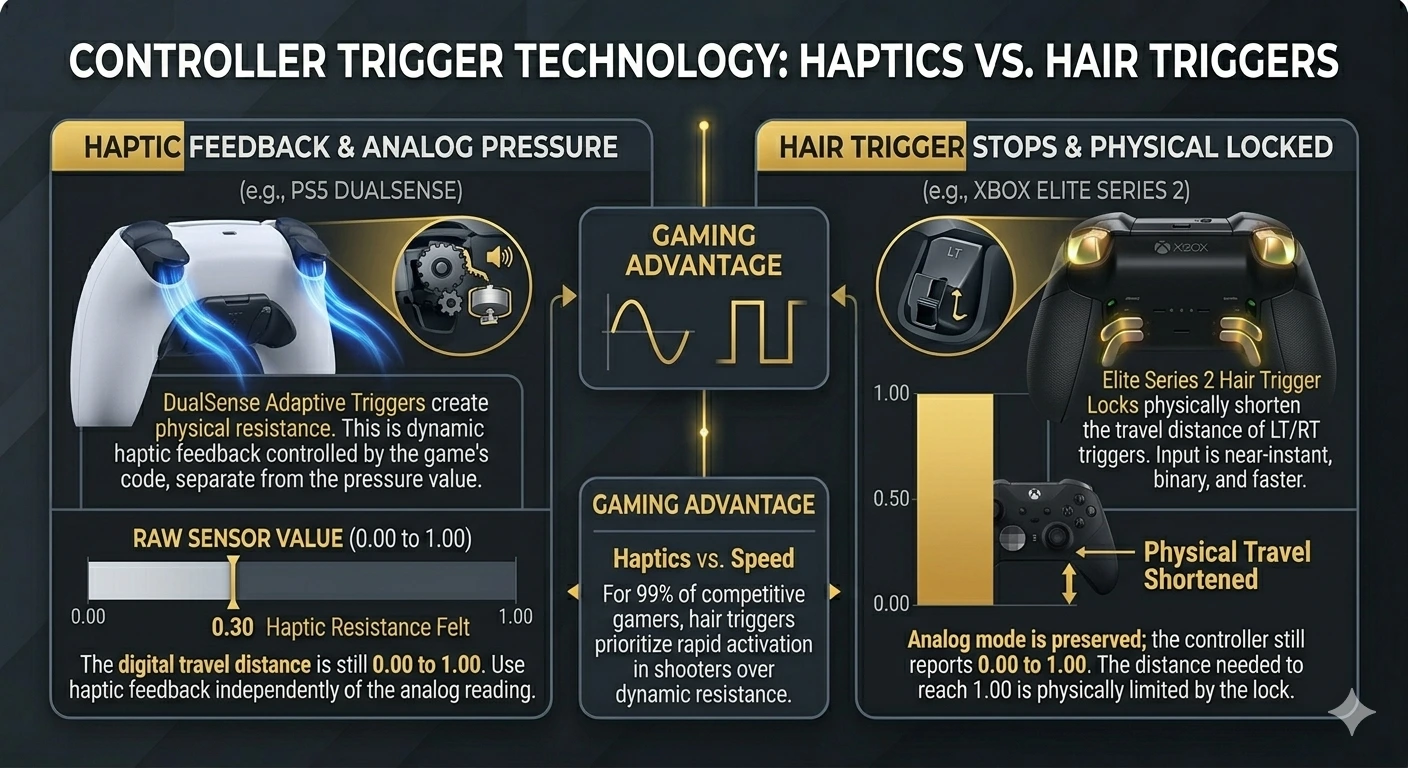
Controller Trigger Technology Comparison

Haptic feedback provides physical resistance or vibration through motors, while analog pressure measures the digital travel distance (0.00 to 1.00) of the trigger. Physical feel does not change the sensor data; even if a trigger feels hard to pull, the digital reading remains independent.

Before testing, understand that physical feedback does not always equal digital data. These haptic features run independently of the pressure reading.

Sony DualSense

Adaptive Triggers

The PS5 DualSense creates physical resistance in L2 and R2 during gameplay. You feel the trigger pushing back. That's haptic feedback — controlled by the game's code via official Sony adaptive technology. It is not the raw pressure reading measured here.

Microsoft Xbox

Impulse Trigger Motors

Xbox One and Series controllers have small rumble motors inside LT and RT. They vibrate in your trigger fingers during gameplay (common in Forza). That's a haptic feature — separate from the analog sensor value.

Diagnostic Note: This tool measures 0.00 to 1.00 travel distance. Adaptive resistance can be felt at 0.30 while the sensor continues to 1.00. For Xbox impulse motors, use a vibration test to confirm they are firing.


How Do Hair Trigger Locks Affect Controller Response Time?

Hair triggers reduce input lag by physically stopping the trigger's travel distance, allowing for faster activation in competitive shooters. While the physical pull is shorter, the controller still reports a full 0.00 to 1.00 analog range to the console or PC.

High-end controllers use physical switches to limit travel distance for faster response times. This is essential for competitive shooters.

Speed Advantage

Why Players Use Them

In FPS games, firing is usually binary. Short travel means faster reaction time between presses. Hair triggers prioritize activation speed over pressure precision.

Device Support

Elite, Edge & Wolverine

Hardware locks on the Elite Series 2, DualSense Edge, and Razer Wolverine V2 physically stop the trigger. This tool helps confirm if your digital max (1.00) is reached even with these locks active.

Analog Integrity: Engaging locks on a Razer Wolverine or Elite 2 doesn't turn off analog mode. The controller still reports 0.00–1.00; the physical distance needed to reach the 1.00 mark is simply shortened by the hardware stop.


What is Trigger Hysteresis?

Hysteresis occurs when your trigger reports different values at the same physical position depending on whether you're pressing down or releasing. This "directional mismatch" often ruins muscle memory.

Sensor Fault

Directional Mismatch

If you see 0.50 while squeezing but the tool shows 0.45 at the exact same spot while letting go, you have hysteresis. This is caused by friction or a dirty potentiometer track inside the controller.

Performance Fix

Repair Action

Clean the sensor track with 90%+ isopropyl alcohol. For Hall Effect triggers (like 8BitDo Ultimate), check for magnetic interference from nearby hardware or internal debris.

Racing Impact: In racing sims (F1, GT7), hysteresis causes inconsistent throttle and braking. Even if you hold a steady finger position, the car's speed will fluctuate, making lap times impossible to predict.


Game Genre Impact — Does Max Travel Matter?

Before worrying about a trigger that caps at 0.90, know your genre. Different games interpret analog depth in very different ways.

Game Type Impact of 0.85 vs 1.00 Max Severity Examples
Racing / Sim Missing top-end throttle and full braking force CRITICAL F1 24, Forza, GT7
Action RPG (Souls) Parry timing and heavy attack activation failures HIGH Elden Ring, Dark Souls
Sports Inability to reach max sprint speed or power shots MEDIUM FIFA (FC), NBA 2K
FPS / Shooters Firing is usually binary (triggers fire at 0.10) LOW Warzone, Apex, CoD

The Bottom Line: If you play Elden Ring or Forza, a worn trigger is a major handicap. However, for Warzone, even a trigger that only reaches 0.50 will usually work perfectly fine for firing.


Frequently Asked Questions

What is a trigger test and what does it measure?

This tool reads the analog pressure value your controller sends via the Gamepad API (0.00 to 1.00). It detects drift, max travel loss, linearity issues, and left/right asymmetry in one session.

My value isn't reaching 1.00 — is that a problem?

0.95–1.00 is healthy. 0.90–0.94 is minor wear. Below 0.85 indicates significant wear. For racing sims, anything below 0.90 will cost you throttle and braking precision.

What is trigger drift and how do I fix it?

Drift is a non-zero value at rest. Use "Calibrate Neutral" first. If it persists, add a 0.02–0.05 deadzone in-game. Drift above 0.10 usually requires hardware cleaning.

Why does my Switch Pro ZL/ZR only show 0 or 1?

Switch Pro triggers are digital (binary), not analog. They only register "on" or "off". A reading of 0 or 1 is the correct intended hardware design.

What is hysteresis and does it matter?

It’s when your trigger reads different values at the same spot depending on if you're pressing or releasing. This causes inconsistent throttle response in racing games.

How do I know if I need a replacement?

Clean with 90%+ Isopropyl Alcohol (IPA) first. If max value stays below 0.85 or values remain "jumpy" after cleaning, the potentiometer likely needs replacement.


Essential Controller Links

Triggers confirmed — run the full diagnostic to ensure total hardware health.

Connect your controller and press Calibrate Neutral first — fingers off triggers. Squeeze slowly to full press. Your max value tells you if you're competitive-ready.