MyGpadTester — Ultimate Golden Edition | Controller Drift & Input Test
Precision Diagnostic Tool

Free Online Gamepad Tester Tool | Test PS5, PS4, Xbox & PC Controllers in 60 Seconds

FIX STICK DRIFT LATENCY CHECK PS5 / XBOX / PC

Tired of missed inputs and random character movement? Don't let a faulty controller ruin your K/D ratio. MyGpad Tester delivers a pro-grade, millisecond-accurate scan to pinpoint stick drift, ghosting buttons, and slow trigger response times instantly.

Whether you're on PS5, Xbox, or PC, our raw Gamepad API integration detects hardware failure before it costs you the game. No downloads, no lag just plug in and verify your controller's health in real-time.

LIVE SCANNER
P1OFFLINE
P2OFFLINE
P3OFFLINE
P4OFFLINE
🎮

Connect Controller

Press any button to begin scanning

User Manual

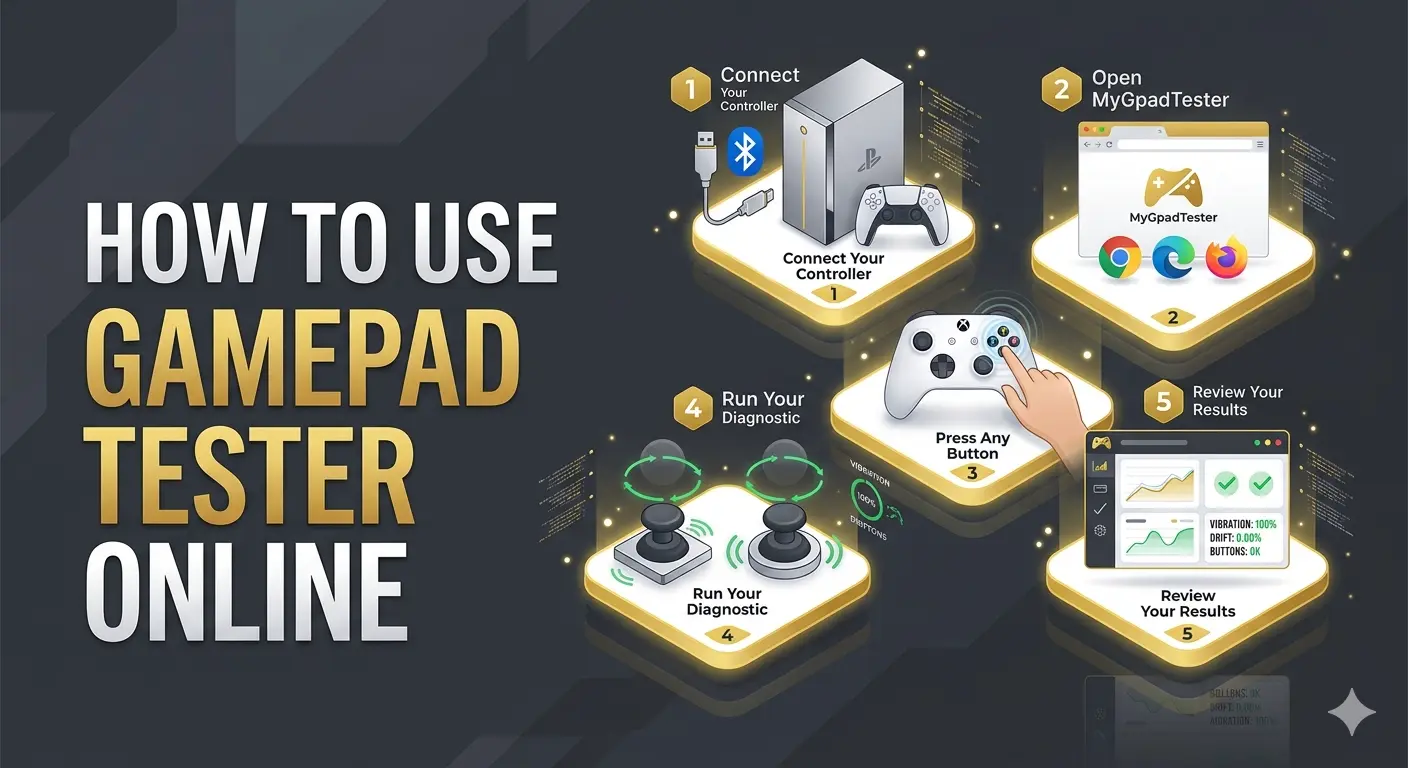
How to Use Gamepad Tester Online — Step-by-Step Guide

Get a full controller diagnostic in under 60 seconds. No downloads. No setup. Just follow these 5 steps.

Infographic showing how to use Gamepad Tester online for controller diagnostics and stick drift testing.
01

Connect Your Controller

Plug your controller into your PC via USB cable, or pair it wirelessly via Bluetooth through your device settings. Works with PS5 DualSense, PS4 DualShock 4, Xbox Series X/S, Xbox One, and most generic USB/Bluetooth gamepads.

02

Open MyGpadTester in Your Browser

Works best on Google Chrome, Microsoft Edge, and Firefox. All three offer full Gamepad API support. Safari has limited compatibility, so Chrome or Edge is recommended for the most accurate diagnostic results.

03

Press Any Button to Activate

Press any button; your controller instantly appears in the interface. Chrome and Edge give the best results. Browsers need this physical input before the Gamepad API activates.

04

Run Your Full Diagnostic

Test every part: Move both analog sticks in full circles to check for stick drift, pull both triggers for pressure values, and run the vibration test to verify both rumble motors are working.

05

Review Your Results

Results appear in real time. Use the diagnostic data to decide if your controller needs cleaning (IPA/Contact cleaner), recalibration, or hardware repair based on unresponsive buttons or axis offset.

What Can You Test In this Online Free
Game Pad Tester Tool?

8 Professional diagnostic modules engineered to expose every hidden fault your controller is carrying.

01/CORE

Gamepad Health Check

Run a full one-click health check and get an instant overview of your entire controller. Generates a total health score where 100% means your hardware is operating within factory specifications.

Gamepad Health Checker
02/INPUT

Button Test

Verify if your inputs actually registered. Catches ghost inputs, stuck buttons, and dead zones on every face button. Validates tactile response and ensures all digital switches are firing correctly.

Launch Button Tester
03/LATENCY

Controller Input Lag Test

Measure the exact communication delay between your controller and your PC in real-time. Tracks input latency in milliseconds (ms) to identify if your Bluetooth or USB connection is causing sluggish gameplay.

Check Input Lag MS
04/DRIFT

Stick Drift Test

Free Online Drift Checker. Set your controller down and see if anything moves on screen. Detects axis jitter where values exceeding 0.05 indicate a worn potentiometer.

Stick Drift Test Online
05/SENSE

Trigger Test

Read your L2/R2 and LT/RT pressure from 0% to 100% in real time. Monitors linear progression to see if your trigger reaches 1.0000 at full pull.

Controller Trigger Test
06/RUMBLE

Vibration Test

Independently test both motors including PS5 DualSense haptics and Xbox Series impulse triggers. Isolate Left and Right haptic channels to check if your rumble motors are failing.

Gamepad Vibration Checker
07/PRECISION

Joystick Deadzone Test

Map your exact deadzone radius where stick movement is intentionally ignored. Calculates the error margin to find the minimum deadzone required in-game.

Joystick Deadzone Test
08/SPEED

Polling Rate Test

Polling rate determines data speed. Reveal your controller's actual performance. Live frequency tracking to measure average vs peak Hz and latency stability.

Gamepad Polling Rate Hz Checker

Supported Controllers PS5, PS4, PS3, Xbox, Switch and More

MyGpadTester works with virtually every major gaming controller through the browser's native Gamepad API. No drivers, no setup, no configuration. Just connect and test.

SONY ECOSYSTEM

PlayStation
Controller Tester

Works with every PlayStation controller from PS3 to PS5. Full button mapping, stick drift detection, and haptic testing DualSense adaptive triggers included.

  • PS5 DualSense: Full axis, button, and haptic actuator diagnostics. Adaptive trigger pressure curve testing and potentiometer drift detection via X/Y axis offset.
  • PS5 DualSense Edge: Sony's pro controller fully supported with precise deadzone calibration, trigger stop testing, and analog stick drift diagnosis.
  • PS4 DualShock 4: Complete XInput mapping for face buttons, shoulder buttons, D-pad, and touchpad click with dual vibration motor output.
  • PS3 DualShock 3: Legacy DirectInput support for basic button and axis detection via USB connection.
MICROSOFT XINPUT

Xbox
Controller Tester

Official support for Microsoft's complete range of competitive controllers.

  • Xbox Series X | S: Full support for buttons, bumpers, analog sticks, and impulse trigger vibration motors with axis offset drift testing.
  • Xbox One Controller: Complete compatibility via USB and Bluetooth for all buttons, triggers, and analog stick axes.
  • Xbox Elite Series 2: Advanced diagnostic capability for paddle inputs, trigger locks, and hair-trigger settings validation.
  • Xbox 360 Controller: Wired USB XInput support for complete button, trigger, and analog stick diagnostics.
NINTENDO SWITCH

Nintendo Switch
Tester

Calibration and input checks for Pro Controllers and individual Joy-Cons.

  • Switch Pro Controller: Full button mapping and analog stick axis testing with vibration motor output support.
  • Joy-Con (L & R): Individual Joy-Con input detection, button registration, and analog stick drift testing via USB or Bluetooth.
  • Wii U Pro Controller: Basic Gamepad API input detection via USB for button and axis registration.
THIRD-PARTY GEAR

PC & Generic
Gamepad Support

Steam Deck's built-in controls and external USB/Bluetooth controllers are fully supported via the Gamepad API.Compatible with every XInput and DirectInput device on the market.

  • Major Brands: Support for Logitech F310/F710, 8BitDo Pro 2, Razer Wolverine, SCUF Impact, and PowerA Fusion Pro.
  • Broad Compatibility: All XInput and DirectInput USB/Bluetooth gamepads are supported natively.
  • Auto-Detection: Connect your controller and press any button the Gamepad API auto-detection handles the rest instantly.

Why Gamers Choose This Tool: Real-Time Data, Zero Setup?

Stick Drift Detection

Subtle axis creep. Phantom inputs. Off-center resting values. Our real-time monitoring detects the slightest analog stick drift before it costs you a match. Get precise X/Y axis offset readings and recalibrate your PS5 or Xbox controller instantly.

No Download Required

100% browser-based utility. No installers or hidden software. Your controller data is processed locally via the W3C Gamepad API—never uploaded, never stored. Fully secure diagnostics.Powered by the native Gamepad API compatible with XInput and DirectInput protocols

Input Feedback

Zero-latency feedback. The moment you press a button, you see it. Real diagnostics require real-time data.

Cross-Platform

Full support on Chrome, Edge, and Firefox across Windows, macOS, and Linux systems.

Universal Support

Works with PS5 DualSense, PS4 DualShock, Xbox Series X/S,Nintendo Switch Pro, and generic pads. If the browser detects it we test it.

Smart Polling

USB connections deliver 1–2ms polling for the sharpest readings, while Bluetooth remains precise for casual diagnostics.

Always Free

Free for every gamer, everywhere. No premium tier, no limits.

Local Processing

Privacy by design. No analytics on your inputs. No tracking. Just clean, private controller diagnostics that stay 100% in your browser.

Zero Calibration

Most tools require calibration before testing. We skip the setup—connect, press any button, and start. Results in under 60 seconds, every time.

Does the gamepad tester work on Mac?
Absolutely. It works on macOS using Chrome, Safari, or Firefox. Simply connect your Xbox, PlayStation, or MFi controller via Bluetooth or USB-C to start testing.
Which browser is best for testing a controller?
Google Chrome and Microsoft Edge are recommended. They provide the most stable and low-latency implementation of the Gamepad API, ensuring accurate real-time feedback.
How do I know if my controller has stick drift?
With the stick fully released, watch the X and Y axis values in the tool. A healthy stick reads 0.0000 on both axes. If the values fluctuate or hold a consistent offset above ±0.05 without any input, your controller is reporting axis drift likely caused by a worn potentiometer or dust buildup on the contact track.
Can I test my controller without a PC?
Yes! You can use your Android smartphone or tablet. Just connect your controller via Bluetooth or an OTG cable and open this site in your mobile browser.
What is polling rate and does it matter?
Polling rate is how often your controller sends data to the device (measured in Hz). Higher rates mean lower input lag. A stable 1000Hz (1ms) is ideal for competitive gaming.
Do Hall Effect controllers still need drift testing?
Hall Effect sensor analog sticks use magnetic positioning instead of physical contact points making them significantly more drift-resistant than Alps Alpine potentiometer sticks. However, axis calibration and deadzone accuracy can still drift over time. MyGpadTester's stick drift test works with Hall Effect controllers including 8BitDo Ultimate, Flydigi Apex, and GuliKit KK3 Pro.
Is MyGpadTester free to use?
Yes, completely free with no conditions. No downloads, no account, no subscription, and no hidden charges. Every diagnostic tool on the site is free to use unlimited times.
Can a gamepad tester detect fake controllers?
Yes. Counterfeit controllers typically show irregular axis readings, inaccurate trigger pressure curves, poor analog stick circularity, and weak vibration motor output.
Does increasing the dead zone reduce stick drift?
It reduces the visible effect but not the actual problem. Masking mild drift with deadzones is temporary. Permanent fixes require cleaning or replacing the joystick potentiometer.