You press a button, but the action on screen feels late? Find which link in the chain is slow, before you blame the controller. Input lag is not one number. It is a chain from your thumb to the screen. The slow link is rarely the one you blame first.
Last updated: 14 November 2026 | Category: Technical Guides | Reading time: about 13 minutes | Tested with Chrome/Edge, Gamepad API
Quick Answer
Controller input lag is the total delay from moving a stick or pressing a button to seeing the action on screen. It includes polling, connection, game processing and display time. A browser test can measure the controller’s contribution, but it cannot measure true end-to-end lag: that needs the game and display too.
Test your controller’s contribution to lag: Input Lag Test Browser test only: it does not measure your monitor or game engine. No download. No account. Data stays in your browser.
The free test shows what the browser can see: how controller reports arrive over time. It cannot watch your thumb move or pixels change, so it is a comparison tool, not a certificate.
The lag chain: one delay, six links
Controller input lag is the total delay from moving a stick or pressing a button to seeing the action on screen. Think of input lag as a chain. The slowest link shapes what you feel. A new controller will not fix a television with Game Mode off. A faster monitor will not fix an unstable wireless link.
| Link | What it adds | How to test it |
|---|---|---|
| Controller sensor + firmware | Time to turn thumb movement into a report | Test the same controller on another PC or console; if the problem follows the pad, it is the pad |
| Polling interval | Report interval: 125Hz = up to 8ms, 1000Hz = up to 1ms | Polling test wired vs wireless, same motion, same browser |
| Connection (USB / Bluetooth / dongle) | Wireless scheduling, interference, low battery, hub | Lag mostly wireless, or only on one connection type |
| OS / software layers | Remappers, overlays, background load, drivers | Lag after installing a new tool, or only with overlays on |
| Game processing | Input handling, frame queue, VSync, frame cap, render load | Lag in one game only, or only at max graphics / VSync on |
| Display | Response time, Game Mode off, motion smoothing, refresh rate | Lag in every game, on a TV without Game Mode, or at low refresh |
Each link can add delay. The slow link is found by changing one link at a time, not by guessing.
Polling interval is maths (1000 ÷ Hz). The other links have no single house ms number here, because they depend on game, display and method. That is deliberate. Different methods, games, refresh rates and displays give different end-to-end totals for the same controller. So no single “DualSense = Xms, Xbox = Yms” table is presented as a house fact.
Input lag vs polling rate vs response time
Polling rate is how often reports arrive, in hertz (Hz), one slice of latency, not the whole delay. See what polling rate means in Hz: What Is Controller Polling Rate? for the full explanation.
Polling interval is the time to the next report: 1000 ÷ Hz. At 125Hz the maximum report interval is 8ms, at 250Hz 4ms, at 500Hz 2ms, at 1000Hz 1ms. That is the controller’s share of the report interval, not total input lag.
Input lag, or latency, is the total thumb-to-screen time, including polling, connection, operating-system and software time, and game processing time, and display time. If any link is slow, the total is slow, even if polling is fast.
Response time in display specifications usually describes how quickly a pixel changes colour. It does not describe how quickly a controller input reaches the screen. A fast pixel response does not, on its own, prove low controller lag.
Drift is not lag. Drift moves without input, lag delays input. A drifting stick can feel laggy, but it is a rest-position fault. If your character or camera moves without you touching the stick, test that separately with Stick Drift Test.
Where controller lag usually comes from
Check in this order: connection first, then polling interval, then software layers.
Bluetooth schedules communication in windows. Interference, weak battery, or a crowded 2.4GHz environment can add delay and variability. A wired USB link, or a dedicated 2.4GHz dongle such as the Xbox Wireless Adapter for Xbox controllers on PC, is usually steadier than generic Bluetooth. It is not an overclock, just a more predictable link.
Polling interval is next. For a wired controller it is set by the USB HID interrupt endpoint, which declares how often the device reports. The browser reads those reports through the Gamepad API, as described in the W3C Gamepad API specification: https://www.w3.org/TR/gamepad/.
Software layers are third. A remapper such as Steam Input or DS4Windows, an overlay, or heavy background load can sit between controller and game. An outdated driver can do the same. If lag appeared after installing a new tool, check that layer before replacing hardware.
Rule: fix the connection before you blame the polling rate. An unstable link adds far more felt lag than a modest polling difference.
What a browser test can and cannot measure
Can measure: Gamepad API timestamp gaps, browser-observed intervals, compare wired versus wireless in the same browser with the same motion, measure stability or jitter over a short test. Jitter means how much the timing wobbles between samples, so a wide spread means an unstable link even if the average looks fine.
Cannot measure: the instant your thumb moves, the instant pixels change, game engine time, display time, or true end-to-end lag.
A reaction-style cue test measures your reaction plus the whole system, not controller lag alone. True end-to-end measurement needs hardware, such as a high-speed camera, a photodiode, or an oscilloscope.
For the controller’s browser-observed contribution only, use these bands as a guide, browser-estimate only, not end-to-end totals: Under 8ms is excellent. 8-16ms is normal. Above 16ms, investigate Bluetooth or driver issues. Stability matters as much as the average.
How to find the slow link (browser check)
What Is Controller Input Lag? Causes, ms, and How to Tell It From Polling Rate.
Total Time: 10 minutes
Test wired vs wireless, same motion, same browser: open Input Lag Test.
For the polling slice, open Polling Rate Test. If wireless is clearly worse or more jittery, the connection is the first suspect. If wired and wireless look similar, the slow link is probably later in the chain.
Change one variable at a time: connection, then game settings, then display.
Swap cable or port, try a dongle instead of Bluetooth, close remappers and overlays, then retest. Then check VSync, frame cap and display mode, then Game Mode and refresh rate. Changing three things at once tells you nothing about which one helped.
Compare in a second game and on a second connection.
If lag follows the controller across games and connections, investigate the controller and its link. If it stays in one game, investigate that game’s settings. If it disappears wired, it was the wireless link.
This is a limited-scope check, not a measurement of true input lag. A full measurement procedure with a longer sample belongs to a separate procedure guide and is deliberately not included here.
Troubleshooting: find your slow link
Match your symptom to its link in the table, then check that link first and retest before you change anything else.
| Symptom | Likely link | Check first |
|---|---|---|
| Lag in every game, every connection | Display / game settings | Game Mode on, refresh rate, VSync, frame cap |
| Lag only wireless | Connection | Cable, dongle instead of Bluetooth, interference, battery |
| Lag only in one game | Game settings | VSync, display mode, frame cap, deadzone / response-curve profile, not hardware until proven in a tester and a second game |
| Lag only with a new tool or overlay | Software layers | Close remappers and overlays, retest |
| Moves without input | Not lag: drift | Test drift separately, do not chase a lag fix |
| Online only, offline fine | Network lag, not controller lag | Network symptom only, not covered in this guide |
VSync can cause lag. To prevent tearing, the graphics processor holds a frame until the monitor is ready, so it is a first check for game-only lag.
A higher refresh rate monitor can reduce lag by shortening the gap between processing and display, but it does not, on its own, fix a bad wireless link. Treat any such change as a first check, then retest.
What “good” input lag means, without inventing a single number
No single house number for good end-to-end lag here. It depends on controller, connection, game, display, refresh rate and method. Use a principle instead: lower and more stable beats lower but spiky.
For competitive play, the combination matters more than one figure. Use wired or a dedicated dongle. Use a high refresh display. Turn Game Mode on. Check VSync and frame-queue settings for that game.
Limitations Box
End-to-end numbers here are not single lab facts, because method, game and display change the total. The chain and browser-observed bands are the checkable parts. A browser test measures Gamepad API timestamps. It does not measure your thumb movement, game engine, or display. And it cannot certify a whole setup. Do not buy a new controller on one browser run. Retest wired and wireless. Change one variable at a time. Compare in a second game first.
Visuals

| Link | What it adds | How to test it |
|---|---|---|
| Controller sensor + firmware | Time to turn thumb movement into a report | Test the same controller on another PC or console; if the problem follows the pad, it is the pad |
| Polling interval | Report interval: 125Hz = up to 8ms, 1000Hz = up to 1ms | Polling test wired vs wireless, same motion, same browser |
| Connection (USB / Bluetooth / dongle) | Wireless scheduling, interference, low battery, hub | Lag mostly wireless, or only on one connection type |
| OS / software layers | Remappers, overlays, background load, drivers | Lag after installing a new tool, or only with overlays on |
| Game processing | Input handling, frame queue, VSync, frame cap, render load | Lag in one game only, or only at max graphics / VSync on |
| Display | Response time, Game Mode off, motion smoothing, refresh rate | Lag in every game, on a TV without Game Mode, or at low refresh |
Only polling interval has a house ms maths value here. Browser-estimate bands shown in the image (under 8 ms excellent, 8-16 ms normal, above 16 ms investigate Bluetooth/drivers) are labelled as the controller’s browser-observed contribution, NOT end-to-end totals. No total end-to-end ms bar is included.
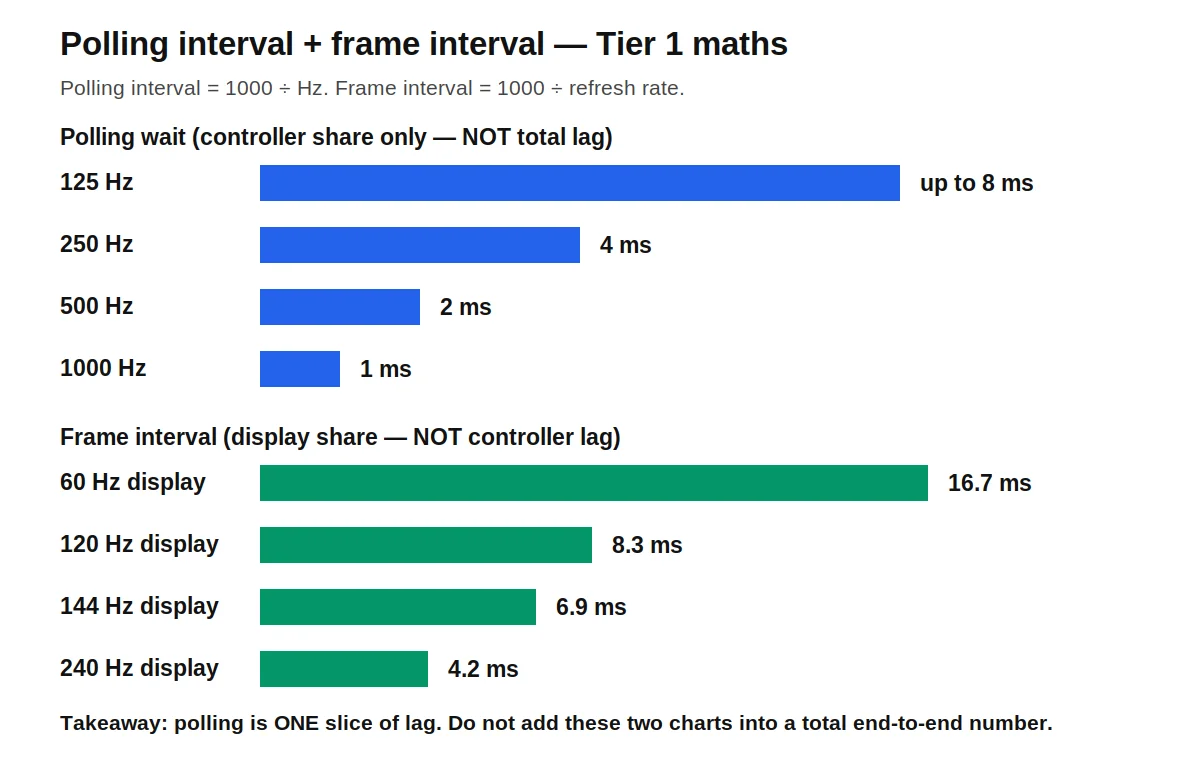
| Polling rate | Maximum report interval |
|---|---|
| 125Hz | 8 ms |
| 250Hz | 4 ms |
| 500Hz | 2 ms |
| 1000Hz | 1 ms |
| Display refresh | Frame interval |
|---|---|
| 60Hz | 16.7 ms |
| 120Hz | 8.3 ms |
| 144Hz | 6.9 ms |
| 240Hz | 4.2 ms |
Tier 1 maths only: 1000 ÷ Hz and 1000 ÷ refresh rate. No total end-to-end ms bar is included in either visual.
Related Tools
This post supports: Input Lag Test
- Gamepad Health Check
- Button Test
- Input Lag Test
- Stick Drift Test
- Trigger Test
- Vibration Test
- Stick Deadzone Test
- Polling Rate Test
More in this category
Pillar tool for this guide: the lag test. Polling rate is one slice of latency: What Is Controller Polling Rate?. Related in another silo: Polling Rate Test – check the polling slice first.
Next in this series: How to Measure Controller Input Lag Online
About the author
Marcus Sterling, Lead Engineer & Founder, MyGpadTester, Austin, Texas, USA
Marcus Sterling is a Certified Hardware Analyst with over 12 years of hands-on experience in gaming peripheral diagnostics. He is professionally certified by iFixit as a Master Tech, and has spent years analyzing Hall Effect sensors to solve the industry’s stick drift crisis. He built MyGpadTester to give every gamer the same pro-level diagnostic tools he uses on his own workbench.
Affiliations: Associate Member of IEEE (Consumer Electronics Society). Specialization: Advanced TMR Magnetic Sensor Calibration & Latency Testing. Former: Lead Tech at Performance Labs TX in Austin. Certifications: ESD Professional & Master Hardware Diagnostic Certified
Tests follow the MyGpadTester methodology: same browser, same connection, wired first, retest before deciding. Results are browser estimates via the W3C Gamepad API, not lab measurements.
Follow Marcus Sterling on X (Twitter): https://x.com/marcussterlin
About: https://mygpadtester.com/about/ | How We Test: https://mygpadtester.com/about/testing-methodology/ | Contact: https://mygpadtester.com/contact/
Last updated: 14 November 2026. How we checked this guide: thresholds are labelled ‘typical’ where they vary by device, game and display. Maths values are shown as 1000 ÷ Hz and 1000 ÷ display refresh rate. Browser-observed intervals come from Gamepad API timestamps.
Frequently asked questions
What is controller input lag? Total delay from thumb movement to screen change, including polling, connection, game and display time.
Is input lag the same as polling rate? No, polling rate is how often reports arrive; input lag is the total time, and polling is only one slice of it.
Does Bluetooth add input lag? Yes, usually higher and more variable; amount depends on interference, battery, dongle: use the wired-vs-wireless comparison. A dedicated 2.4GHz dongle is usually steadier than generic Bluetooth.
Can I test true input lag in a browser? No, a browser cannot see your thumb move or pixels change; it can measure the controller’s browser-observed contribution and compare wired vs wireless; true end-to-end needs hardware measurement.
Why does my controller lag only in one game? That points to that game’s settings (VSync, frame cap, display mode, deadzone/profile) or overlays; it does not point to the controller alone, until proven in a tester and a second game.
Does VSync cause input lag? Yes, it can add buffering delay to prevent tearing; the GPU holds a frame until the monitor is ready; that is why VSync/frame-cap settings are a first check for game-only lag.
Does a higher refresh rate monitor reduce input lag? Yes, it shortens the gap between an action being processed and appearing on screen; it also raises the browser frame-rate gate for Gamepad API readings; it does not fix a bad wireless link on its own.
Why does my controller lag only online? If offline play feels fine and online play feels late, that points to network lag, not controller lag. Check the network symptom separately and do not chase a controller fix for it.
Next steps
If the fork points to the controller, run Polling Rate Test next to check the polling slice, and follow the measurement guide on measuring controller input lag online.
If the fork points to the game or display, follow the Bluetooth lag fix guide and the guide on reducing input lag on PC.
If the controller moves without input, run Stick Drift Test instead: drift is not lag, and it needs a different test.
If several faults appear together, run Gamepad Health Checker for a full screening before you buy or repair anything.
Last updated: 14 November 2026. Numbers in this guide are either maths (1000 ÷ Hz, 1000 ÷ refresh rate), or typical values labelled as typical. No single total end-to-end lag value is given as a house lab measurement.