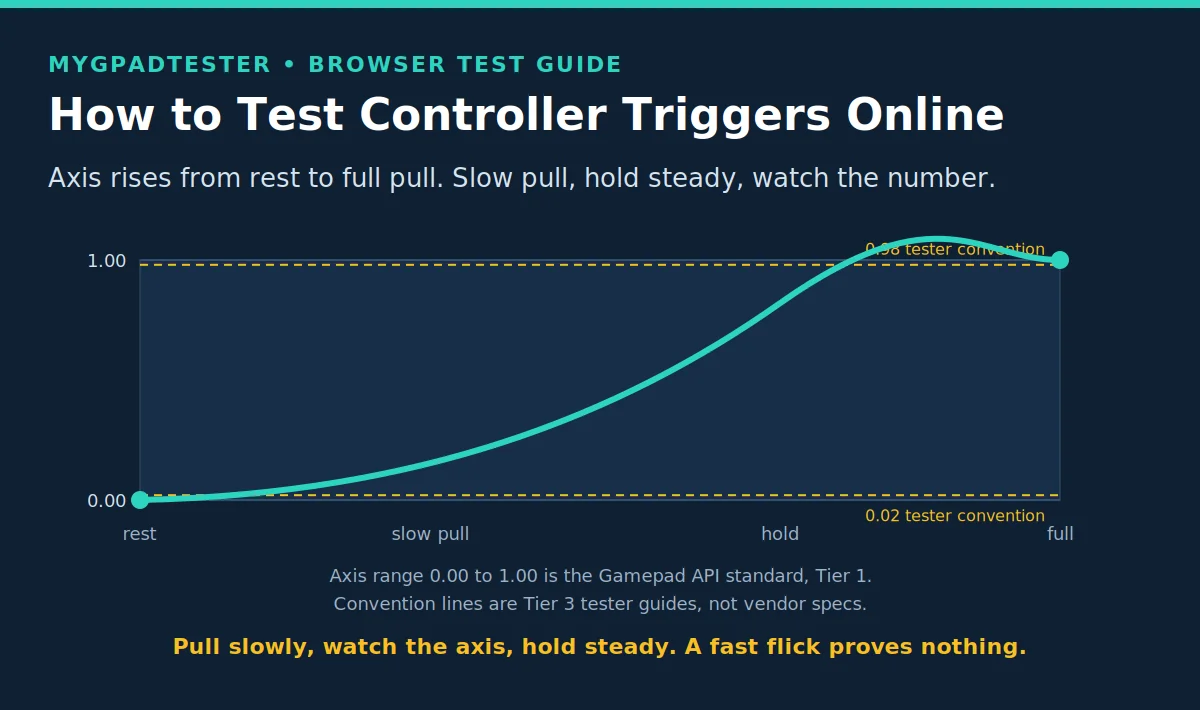
How to Test Controller Triggers Online
Meta line: Last updated 13 November 2026 | Category: Controller Testing Tools | Reading time: about 8 minutes | Tested with Chrome/Edge, Gamepad API
Your trigger does not reach full in game, or the axis jumps while you hold it? Test your trigger axis online in about a minute and get a number, not a guess. Read the axis at rest, pull slowly to full, hold steady, then check wired versus wireless.
Quick Answer
Open the trigger test in Chrome or Edge, press each trigger slowly from rest to full pull, and watch the axis value. A clean trigger rises smoothly, reaches near full, and holds steady. A browser test shows travel and stability, not spring feel or physical travel distance.
No download. No account. Data stays in your browser.
What a trigger reading actually is
A trigger is an analog input, read as an axis from 0.00 at rest to 1.00 at full pull. The browser reads that axis through the Gamepad API, which reports axes in a fixed range, so every controller speaks the same number language here (Tier 1).
A clean trigger rises smoothly as you pull, reaches near full at a full pull, and holds steady while you hold it. That is travel and stability, and a browser test can show both. It cannot feel spring resistance, and it cannot measure a physical travel distance in millimetres.
Two house tester conventions help you read the number, and they are conventions only, never Sony, Microsoft or Nintendo specifications (Tier 3). A rest value above 0.02 needs a check. A full pull below 0.98 needs a check.
One distinction keeps this post honest. A trigger press is input: the axis value your finger creates. Vibration is output: the motors the game drives. They are different systems, so a trigger test never proves a vibration fault, and a vibration test never proves a trigger fault.
One exception lives inside the trigger itself. Xbox impulse triggers are output, not input: small motors in the triggers that shake during gameplay. If impulse vibration is missing, that is a vibration fault in the trigger housing, not a trigger axis fault, so test it as vibration, not as axis travel.
DualSense adaptive triggers are the other direction: input resistance, not vibration. They change how hard the trigger feels to pull. A browser test reads the axis, not the resistance, so adaptive trigger problems get their own PC fix, linked in the Next Steps.
Five terms, one reading, so the number is never misread. Trigger axis: the 0.00 to 1.00 value, Tier 1 Gamepad API. Report interval: 1000 divided by Hz, nominal, not a delay (Tier 1). Input latency: the total delay from pull to game response. Jitter: variation in the reading, described qualitatively, no percent rule. Browser measurement: what the browser sees in Gamepad API data, not a physical pull to photon measurement. No site sample size or measured range is claimed here. The 0.02 and 0.98 lines are Tier 3 tester conventions, not vendor specifications and not site measurements.
Trigger reading guide
| Reading | What it means | Next step |
|---|---|---|
| Rest 0.00 | Clean rest, no input reported | None, pull to full next |
| Rest above 0.02 | Tester convention: needs a check | Clean around the trigger base, do not open the controller, retest wired |
| Peak near 1.00 on a slow full pull | Full travel reads clean | Hold and check stability next |
| Peak below 0.98 on a slow full pull | Tester convention: needs a check | Retest wired, then retest with no remapper |
| Value jumps while held steady | Unstable reading, not a clean hold | Change one variable and retest |
| Value returns to 0.00 on release | Clean return to rest | None, test the other trigger |
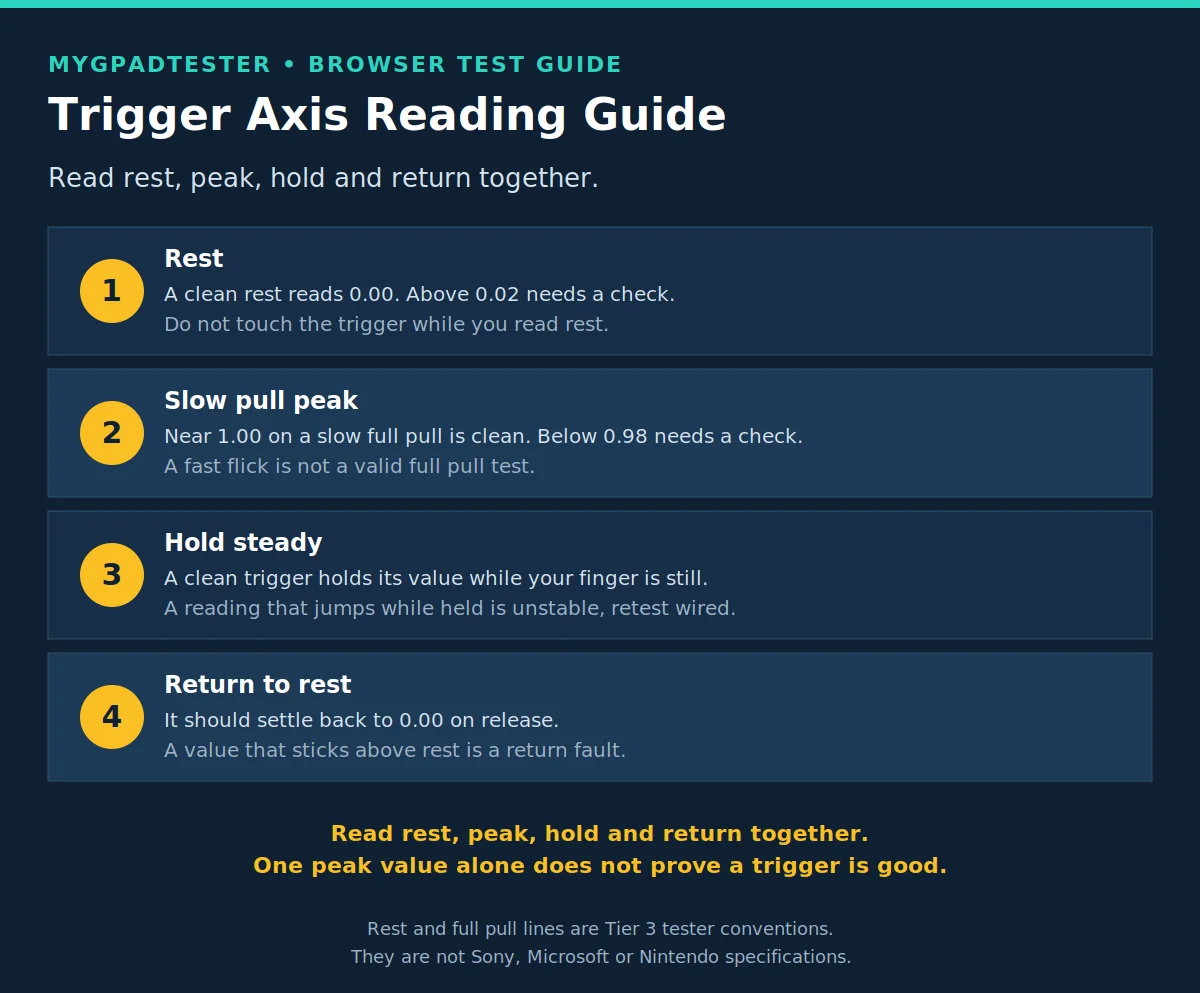
How to test your triggers, step by step
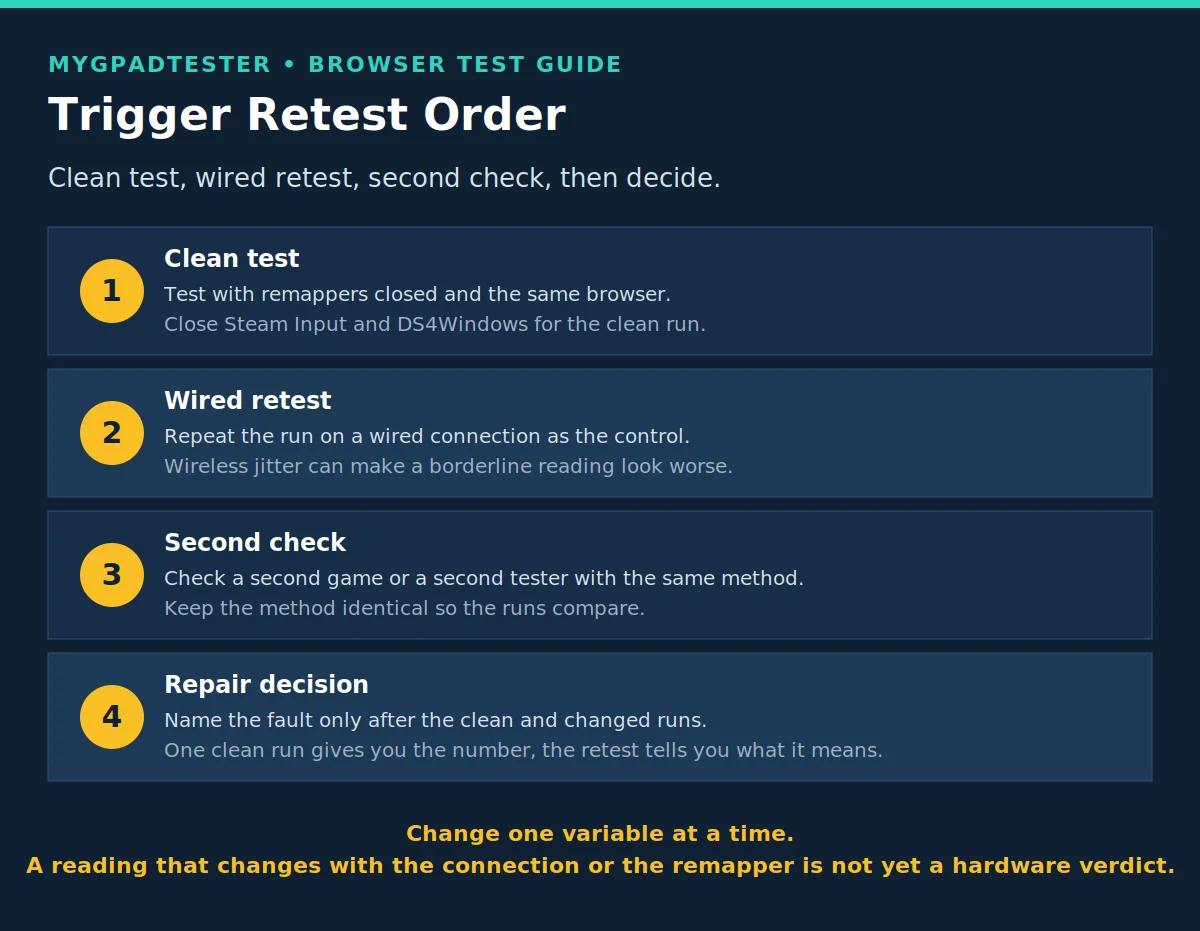
Test both triggers in the same run, and change only one variable at a time. That is the whole method: one clean run, then one change, then compare.
- Open the test in Chrome or Edge and wake the controller. Press every button once and move both sticks so the controller is awake and reporting. Use the same browser for both runs you compare. If the controller is not detected at all, stop here and fix detection first.
- Read both triggers at rest and record the value. Do not touch them. A clean rest reads 0.00. Above 0.02 needs a check under the tester convention, and it is a convention, not a vendor limit.
- Pull one trigger slowly to full and record the peak value. A slow pull matters: a fast flick can overshoot or undershoot and tell you nothing. Near 1.00 is clean. Below 0.98 needs a check under the tester convention.
- Hold at full pull for a few seconds and watch for jumps. A clean trigger holds steady. A reading that jumps while your finger is still is an unstable trigger, so note it and move on.
- Release slowly and record the return to rest. It should settle back to 0.00. A value that sticks above rest after release is a return fault, so note it.
- Repeat wired if the first run was wireless. Wireless jitter can make a borderline reading look worse, and Bluetooth can throttle idle reports on some devices, firmware, and browsers. The wired run is your control.
- Close remappers for the clean test, then re-enable afterwards if you use them, and note any change. Steam Input and DS4Windows sit between the game and the controller, so a reading that changes with the remapper is a layer fault, not yet a hardware verdict.
Browser and platform limits
A browser test reads the trigger axis only. It cannot tell you why the axis is off, and it cannot separate a worn trigger from a platform setting on one run alone.
It cannot feel spring resistance, so a stiff or mushy trigger can still read a clean axis. It cannot measure physical travel distance. What it gives you is travel and stability, and that is enough to decide your next test, not your repair.
Test in Chrome or Edge, and use the same browser for both runs you compare. Firefox works for basic testing. Safari and mobile are limited for this kind of test.
Troubleshooting: trigger reading faults and what to do next
Match your reading to the row that fits, then retest with one variable changed before you decide anything.
| Problem | Likely cause | Fix | Retest |
|---|---|---|---|
| Trigger stops below full pull | Worn sensor or spring, or a platform sensitivity setting | Retest wired with no remapper, then check the platform controller settings | If it still stops below 0.98, it is the trigger, not the setting |
| Axis jumps while held steady | Unstable reading: connection jitter, interference, or a failing sensor | Change one variable: wired first, then a different port or room | If it jumps wired too, the sensor is suspect |
| Trigger reads a value at rest | Rest offset fault | Clean around the trigger base, do not open the controller, retest wired | If it stays above 0.02, it needs a check, not a deadzone mask |
| Trigger works on PC but not on console | Platform or game layer, not the axis | Confirm the axis reads clean on PC first, then check the console game settings | If the PC axis is clean, the fault is the platform layer |
| Trigger changes after a remapper update | Remapper layer fault | Test with the remapper closed, then re-enable and compare | If the clean run is clean, keep the remapper setting that reads clean |
| One trigger only reads badly | Single trigger fault | Test the other trigger as the control, same steps, same connection | If only one fails everywhere, it is that trigger |
Frequently Asked Questions
How do I test my controller trigger online?
Open the trigger test in Chrome or Edge, pull each trigger slowly from rest to full, and watch the axis value. Record rest, peak, hold, and return. That is the whole test: one clean run gives you the number, and the retest tells you what the number means.
What should a trigger read at rest?
0.00. That is the axis at rest, Tier 1 Gamepad API. Above 0.02 needs a check under this site’s tester convention, which is a house guide, not a Sony, Microsoft or Nintendo specification.
What should a trigger read at full pull?
Near 1.00 on a slow, deliberate pull. Below 0.98 needs a check under the tester convention. A fast flick is not a valid full pull test, because it can overshoot or undershoot.
Why does my trigger jump while I hold it?
Your finger is still but the reading moves, so the signal is unstable. Change one variable and retest: wired first. If it still jumps on a wired run with no remapper, the sensor or the trigger path is suspect.
Does Bluetooth change a trigger reading?
It can. Bluetooth can throttle idle reports on some devices, firmware, and browsers, and wireless jitter can make a borderline reading look worse. That is why the wired run is the control, not an extra.
Why does my trigger work on PC but not on console?
Because the trigger axis and the platform layer are different things. If the axis reads clean on PC, the trigger hardware is fine and the fault sits in the console’s game or system setting. Fix the setting, not the controller.
Should I use deadzone for a trigger problem?
Deadzone can hide a rest value fault, but it does not repair a worn trigger. A deadzone mask on a failing sensor only delays the decision. Trigger deadzone gets its own post later; this post is the test, not the mask.
Why does my trigger feel stiff or mushy but read clean?
Because a browser test reads the axis only. It cannot feel spring resistance, and it cannot measure physical travel distance. A stiff or mushy trigger can still rise smoothly, reach near full, and hold steady. That clean reading shows travel and stability only. It does not judge how the trigger feels. Retest wired with no remapper, then judge feel separately from the number.
Related Tools
- Polling Rate Test
- Vibration Test
- Trigger Test (pillar, highlighted)
- Stick Drift Test
- Stick Deadzone Test
- Button Test
- Input Lag Test
- Gamepad Health Checker
Related Guides
About the Author
Marcus Sterling, Lead Engineer and Founder of MyGpadTester, Austin, Texas.
- Author Profile: Marcus Sterling
- X: X
A tester number is evidence, not a repair certificate. Repeat it wired, repeat it without a remapper, and check warranty before opening the controller.
Next Steps
If your DualSense adaptive triggers fail only on PC, that problem gets its own PC fix post. If vibration fails, the vibration test and its fix path come first. If other parts fail too, run the full check: Gamepad Health Checker.