Is Bluetooth really slower than a dongle? Should you buy the dongle version, or are you fine as you are? Why does the controller sometimes spike when your headphones are connected? This post compares the two wireless links by protocol, steadiness, and placement, with no invented gap.
Last updated: 19 November 2026 | Category: Controller Comparisons | Reading time: about 13 minutes | Tested with Chrome/Edge, Gamepad API
Quick Answer
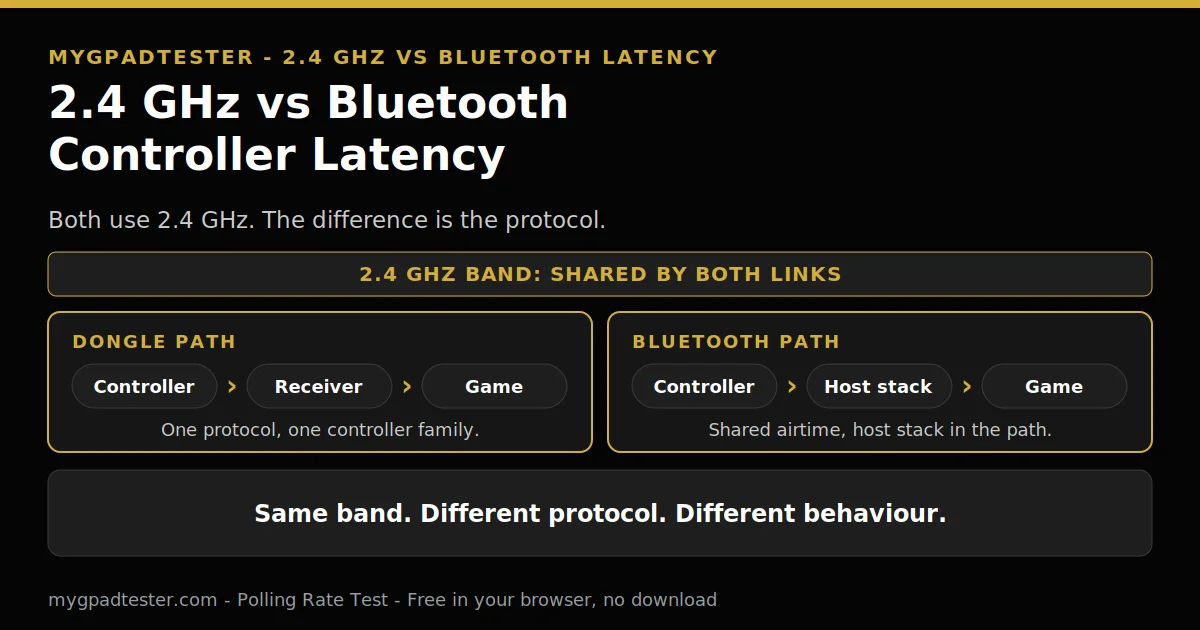
A 2.4 GHz dongle is usually steadier than Bluetooth, but not because it uses a different radio band: both use 2.4 GHz. The difference is the protocol. The dongle speaks one dedicated protocol to one controller family, while Bluetooth runs through the host stack and shares airtime with other devices.
No download. No account. Data stays in your browser.
Both links use the same 2.4 GHz band, so the band cannot explain the difference. The protocol and the path decide how steady each link feels. Run a quick check with the free browser tester before you buy anything, and use the decision fork near the end to pick the link that fits your setup.
Is a 2.4 GHz dongle actually faster than Bluetooth?
A 2.4 GHz dongle is usually the steadier wireless link, but the reason is the protocol, not the band. Both links use 2.4 GHz. The dongle runs one dedicated protocol to one controller family, while Bluetooth runs through the host stack and shares airtime with every other paired device.
The dongle talks to one controller family, and nothing else shares its path. A Bluetooth link shares airtime with other Bluetooth devices, Wi-Fi, and other traffic in the same band. Extra connected devices can make a Bluetooth link less steady. That is why a Bluetooth link can feel fine one minute and spike the next.
Spikes matter more than the average here. A link that reports steadily feels better than a link with a lower average and sudden spikes. Retransmission is part of that story: a lost packet is sent again, and the retry shows up late. No verified millisecond gap between a dongle and Bluetooth was found in this run, so this post quotes no gap figure at all.
| Link | What it is | When it wins | What can go wrong | Where it works |
|---|---|---|---|---|
| Wired | A cable between the controller and the host | When steadiness matters most | The cable limits movement | Any host with a USB port |
| 2.4 GHz dongle | A dedicated receiver for one controller family | On one PC, for the steadiest wireless link | Interference and placement can still hurt it | Devices the maker supports for that receiver |
| Bluetooth | A shared wireless stack on the host | Across phone, tablet, and PC, with no receiver | Shared airtime, spikes, and retransmission | Any host with Bluetooth |
What is a 2.4 GHz dongle, and what is it not?
A 2.4 GHz dongle is a small USB receiver that talks to one controller family using the maker’s own radio protocol, not Bluetooth. Because both ends of the link are under one maker’s control, the receiver has no host Bluetooth stack in its path and no negotiation with other peripherals.
A dongle is not Wi-Fi. It is not Bluetooth. It is not a universal receiver. A dongle usually works only with its own controller family, and it is not interchangeable across models. Check the maker notes before assuming a spare dongle works with a different pad.
The Xbox Wireless Adapter is one example of a dedicated receiver. It uses the Microsoft proprietary Xbox Wireless protocol, not Bluetooth. Microsoft lists that it connects up to 8 Xbox Wireless Controllers at once on a Windows 10 PC. Microsoft also lists a supported headset with the 3.5 mm audio jack as an adapter feature, and lists some functionality as not supported on Android, iOS or via Bluetooth. No rate number is given for the adapter in this post, because none is asserted for it here.
Does Bluetooth cap my controller at 125 Hz?
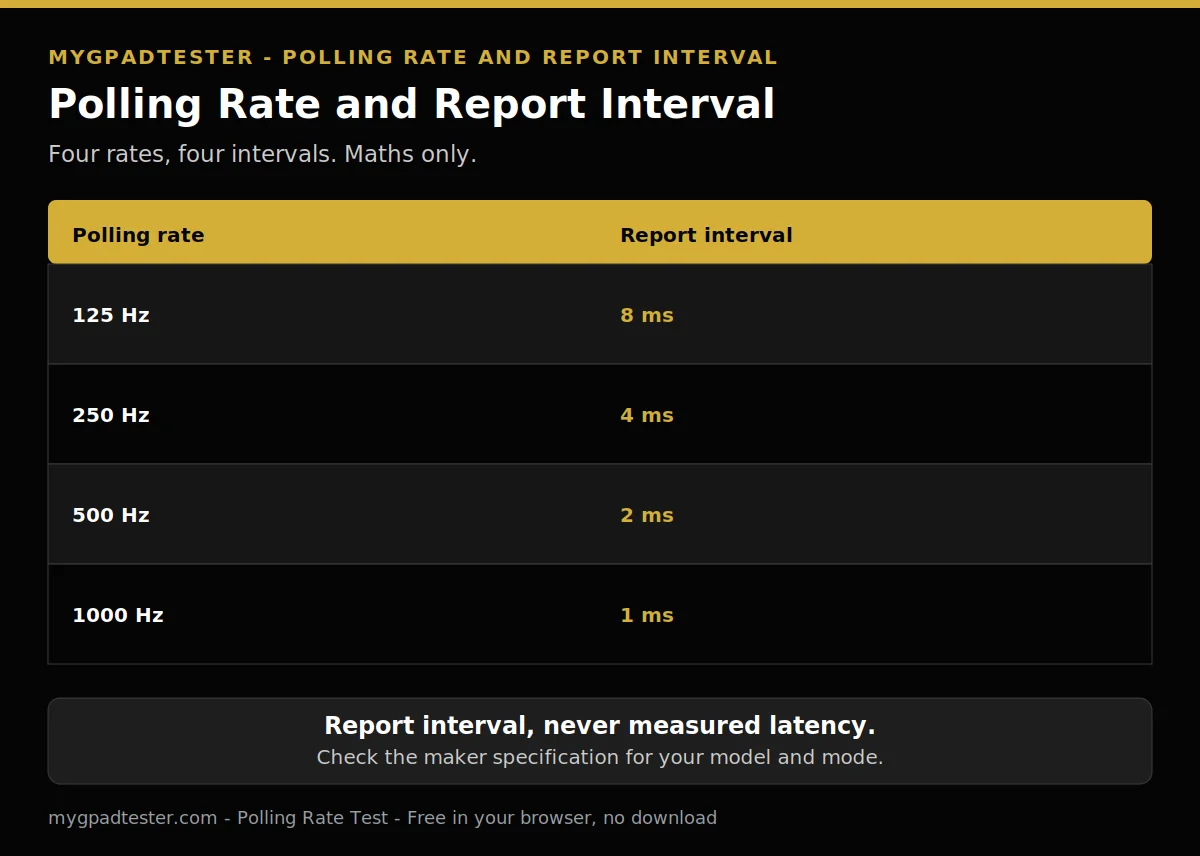
No, Bluetooth does not cap every controller at 125 Hz. Polling varies by controller, host, and mode, and Xbox Bluetooth typically runs at about 125 Hz, lower and more variable. The report interval maths still applies: 125 Hz means a report interval of 8 ms, and 250 Hz means 4 ms.
No blanket cap applies to every controller. Xbox Bluetooth runs at about 125 Hz, lower and more variable, as a typical browser-observed figure. DualSense Bluetooth runs at about 125 Hz typical. DualSense wired runs at about 250 Hz typical. Each figure is typical, never a maker specification.
Report interval is maths, not measured latency. Divide 1000 by the rate to get the interval. A higher rate means a shorter interval between reports. It does not mean the whole input chain takes that long.
| Polling rate | Report interval |
|---|---|
| 125 Hz | 8 ms |
| 250 Hz | 4 ms |
| 500 Hz | 2 ms |
| 1000 Hz | 1 ms |
Do all dongles run at 1000 Hz?
Some dongles reach 1000 Hz, but not every dongle does, and the rate depends on the model and the mode. Check the maker specification for your exact controller and receiver before assuming a number, and never treat a dongle as a guaranteed 1000 Hz link.
Some PC pads support up to 1000 Hz in dongle mode. That is a per-model fact, not a promise for every dongle. The rate depends on the model and the mode. A receiver that runs fast with one pad may run slower with another, or in a different mode.
Check the maker specification for your exact controller and receiver. Look for the dongle-mode rate, not the wired rate. If the maker gives no dongle-mode rate, do not assume one.
Why does Bluetooth lag more when my headphones are connected?
Bluetooth can lag more when headphones or other Bluetooth devices are connected, because Bluetooth shares airtime and the host stack serves every paired device. Test it with one change: disconnect the extra device, retest in the same game, and see whether the spikes go away.
The host stack serves the controller, the headphones, and any other paired device through the same radio path. Extra connected devices can make the link less steady.
Test with one change only. Disconnect the headphones, and retest in the same game and the same scene. If the spikes go away, shared airtime was part of the problem. If they stay, the cause sits elsewhere. The full Bluetooth fix order is in the Bluetooth lag fix post, named here in plain text and linked in Related Guides below.
Can USB 3.0 ports really interfere with a dongle?
Yes, moving the dongle can help, because USB 3.0 ports, cables, and drives radiate broadband noise in the 2.4 GHz band, and a receiver sitting next to that noise hears its controller worse. Put the dongle on a short extension cable, out in the open, away from USB 3.0 ports and metal, then retest.
Intel documented this interference mechanism in an April 2012 white paper. USB 3.0 SuperSpeed signalling at 5 Gbps radiates broadband noise that overlaps the 2.4 to 2.5 GHz band. Wi-Fi, Bluetooth, and proprietary dongles all use that band. Distance, shielding, and a USB 2.0 port or extension cable reduce the noise the receiver hears.
USB 3.0 ports radiate broadband noise in the 2.4 GHz band. A receiver next to that noise hears its controller worse. Do not change the placement and another setting in the same test.
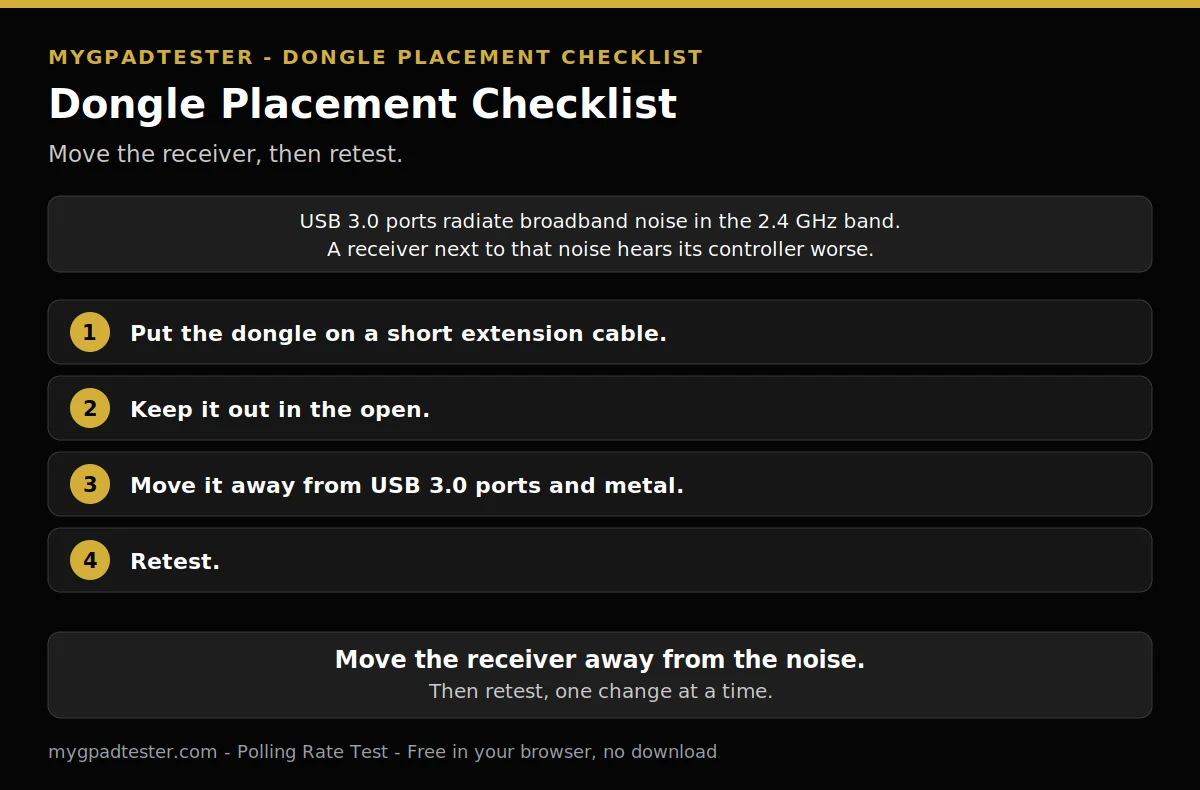
- Put the dongle on a short extension cable.
- Keep it out in the open.
- Move it away from USB 3.0 ports and metal.
- Retest.
Should I buy the dongle version or stay with Bluetooth?
Buy the dongle version if you play on one PC, want the steadiest wireless link, and have a free USB port. Stay with Bluetooth if you switch between phone, tablet, and PC, travel often, or have no spare port, because Bluetooth needs no receiver to lose.
One PC and one desk favour the dongle. A free USB port is the only cost, plus the receiver itself. If the port is behind the PC, use the placement checklist in the previous section.
Many devices favour Bluetooth. A phone, a tablet, and a PC can all pair with the same pad, and travel needs no receiver. A lost dongle ends the link until a replacement arrives, and a replacement must match the controller family.
The polling side of this comparison is in the USB versus Bluetooth post. The data comparison across wired, dongle, and Bluetooth lives in Wired vs Wireless Controller Input Lag, Data Comparison. No model is recommended in this post. Pick by setup, not by brand.
My dongle controller still lags. What do I check first?
If your dongle controller still lags, check the battery, the distance, nearby interference, and the firmware before blaming the dongle. Run the wired baseline test first: if the same controller is steady on a cable, the slow link is the radio path, not the controller.
Check in this order. Charge the controller, and retest. Move closer to the receiver, and test again. Move the receiver away from USB 3.0 ports, metal, and other 2.4 GHz traffic, and test again. Check the firmware last, with no version assumed here. Change one thing per test, and note which change clears the spikes.
The wired baseline test procedure lives in the wired-versus-wireless data comparison; this post does not rebuild it. The measurement post and the Bluetooth fix post are named here in plain text, and they are linked in Next Steps and Related Guides. Stop as soon as the delay is gone, and keep the change that fixed it.
Related Tools
- Polling Rate Test (pillar, highlighted)
- Input Lag Test
- Button Test
- Trigger Test
- Vibration Test
- Stick Drift Test
- Stick Deadzone Test
- Gamepad Health Checker
Related Guides
- 125Hz vs 250Hz vs 500Hz vs 1000Hz Controller Polling Rate
- Bluetooth Controller Lag Fix
- Wired vs Wireless Controller Input Lag, Data Comparison
- Xbox vs PS5 Input Lag Comparison
About the Author
Marcus Sterling, Lead Engineer and Founder of MyGpadTester, Austin, Texas. Profile: https://mygpadtester.com/marcus-sterling/ X: https://x.com/marcussterlin
Same band, different protocol. Pick the link that fits your setup, fix the placement first, and test one change at a time.
Frequently Asked Questions
Is Bluetooth fine for casual games?
Yes, for most casual play. At 60 Hz a frame is 16.7 ms, so a small Bluetooth variation is hard to notice outside fast competitive play. The gap matters most where timing is tight and spikes land mid-action.
Does a Bluetooth adapter lower lag?
Only if the PC has no Bluetooth or a weak built-in module. An adapter changes the radio, not the protocol, so it does not turn Bluetooth into a dongle link. Test with the adapter, then without, in the same game.
Does Bluetooth avoid busy Wi-Fi channels on its own?
Partly. Bluetooth uses adaptive frequency hopping to dodge busy channels, which reduces the chance of interference but does not guarantee an error-free link. A crowded band can still cause spikes, so test with extra Bluetooth devices disconnected.
Does Bluetooth drain the controller battery faster than a dongle?
No verified comparison of Bluetooth versus dongle battery drain for controllers was found in this run, so this post gives no battery verdict. If battery life matters to you, test both links on your own controller and compare.
Why does my controller work on Bluetooth but the headset jack does not?
Microsoft lists some functionality as not supported via Bluetooth, and lists a supported headset with the 3.5 mm audio jack as an Xbox Wireless Adapter feature. Test the adapter or a cable on your setup, and check the Microsoft Store listing for your adapter and controller combination.
Is 5 GHz Wi-Fi affected by USB 3.0 interference?
No. The Intel interference is a 2.4 GHz band issue, so 5 GHz Wi-Fi sits outside the affected band. Moving Wi-Fi to 5 GHz where possible reduces crowding in the 2.4 GHz band.
A 2.4 GHz dongle is usually the steadier wireless link, because it runs one dedicated protocol to one controller family. Bluetooth shares airtime through the host stack, so it spikes more when other devices join. No verified millisecond gap is quoted in this post. Pick by your setup, fix the placement first, and test one change at a time.
Next Steps
Test your polling rate with the Polling Rate Test, then test the dongle and Bluetooth on the same controller. Read How to Test a Bluetooth Controller in Browser for the Bluetooth test procedure. Read How to Reduce Controller Input Lag on PC for the general PC fix order. Read How to Measure Controller Input Lag Online for the measurement procedure.