Wired vs Wireless Controller Input Lag, Data Comparison
Is wired really faster than wireless? How much lag does Bluetooth add? Is wireless good enough for competitive play, or must you use a cable? This post compares the three connections with the method named every time, so you can see what each number actually measures.
Last updated: 18 November 2026 | Category: Controller Comparisons | Reading time: about 12 minutes | Tested with Chrome/Edge, Gamepad API
Quick Answer
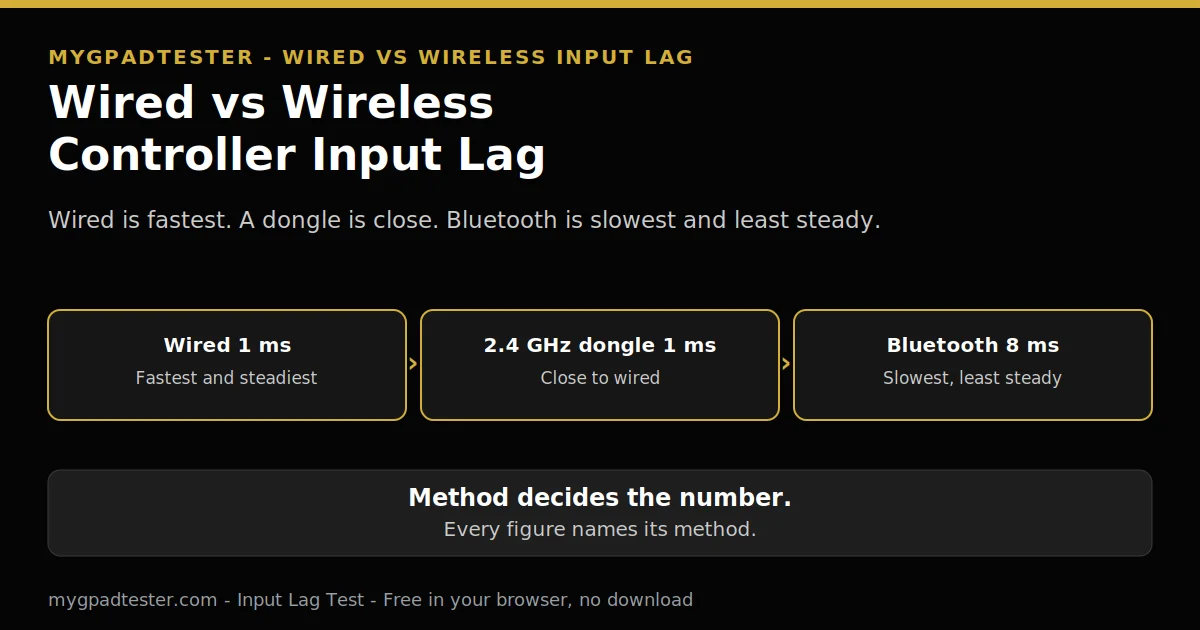
Wired is the fastest and steadiest connection, a 2.4 GHz dongle is close to wired, and Bluetooth is the slowest and least steady. The gap is a few ms, not a different game, and the spikes matter more than the average. Every figure in this article names its method, because the method decides the number.
Test your input lag
No download. No account. Data stays in your browser.
Wired is the fastest and steadiest connection. The 2.4 GHz dongle is close behind. Bluetooth is the slowest and least steady. The rest of this post shows the numbers behind that order, and how to test all three yourself.
Is wired really faster than wireless?
Yes, wired is faster than wireless, but the gap is small and the steadiness matters more than the average. A wired link reports on a fixed cable, while a wireless link shares a radio, so the wireless number moves around more.
A 2.4 GHz dongle is close to wired in the sources. Bluetooth is the gap. No single number is given for the gap. Test the three connections with the Input Lag Test, wired first as your baseline.
How much lag does each connection add, in ms?
Wired adds the least lag, a 2.4 GHz dongle adds a little more, and Bluetooth adds the most, but every figure below names its method, because the method decides the number. The table gives ranges by method, never one blended number.
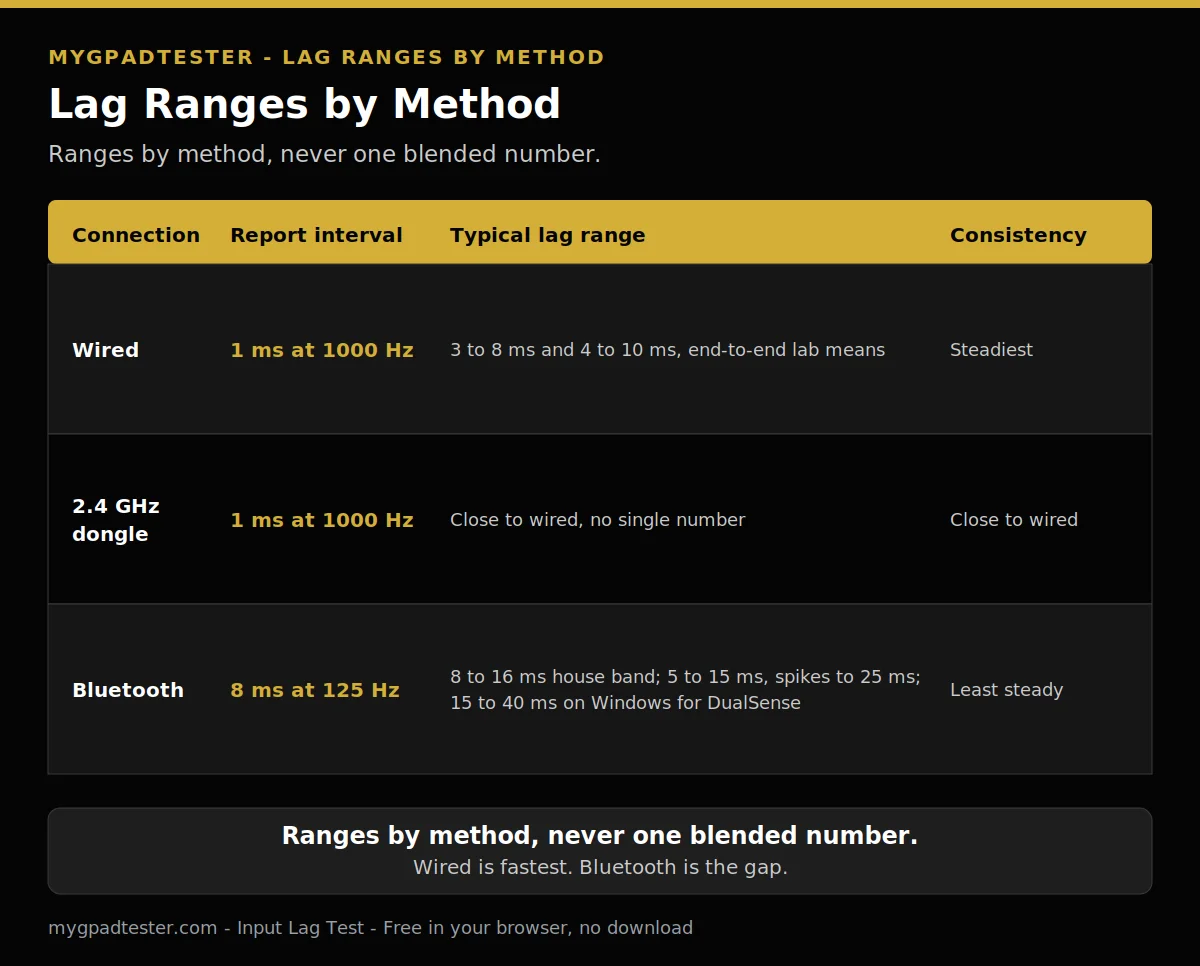
| Connection | Typical report interval | Typical lag range | Consistency | Method named per row |
|---|---|---|---|---|
| Wired USB | 1 ms at 1000 Hz | 1 to 3 ms report-interval framing; 3 to 8 ms and 4 to 10 ms end-to-end lab means | Steadiest | Tier 1 maths for the interval; end-to-end lab bench for the means |
| 2.4 GHz dongle | 1 ms at 1000 Hz | Close to wired, no single number | Close to wired | One adapter guide |
| Bluetooth | 8 ms at about 125 Hz | 8 to 16 ms house browser band and guide range; 5 to 15 ms with spikes to 25 ms guide range; 15 to 40 ms end-to-end lab range on Windows for DualSense | Least steady, spikes | House browser band; guide range; end-to-end lab range |
Three measurement kinds, never blended. Report interval is Tier 1 maths. Browser-observed lag bands are house bands, controller-to-browser only. End-to-end lab numbers are Tier 3, method named. Never present a browser number as end-to-end lag. Never present a report interval as a measured lag.
Five terms, kept apart. Polling rate is how often the controller reports. Report interval is the gap between reports. Input latency is the full time from button press to screen. Jitter is the variation between reports. Browser measurement is what a browser test can see, which is the controller-to-browser part of the chain, not the full chain.
Is Bluetooth slower than a 2.4 GHz dongle, and by how much?
Yes, Bluetooth is slower than a 2.4 GHz dongle, because Bluetooth shares a radio and a stack built for many devices, while the dongle runs one dedicated protocol. No single number is given for the gap, because the gap moves with the room, the stack, and the controller.
A 2.4 GHz dongle is close to wired in the sources. Bluetooth is the gap. No single number is given for the gap, because the gap moves with the room, the stack, and the controller. The polling side of the same comparison is in the USB versus Bluetooth post.
Is wireless good enough for competitive play?
A 2.4 GHz dongle is good enough for competitive play for most players, because it sits close to wired in the sources, while Bluetooth is the connection to avoid when the match matters. If the match matters, wire the pad or use the dongle, not Bluetooth.
A 2.4 GHz dongle is close to wired in the sources. The browser lag bands are under 8 ms excellent, 8 to 16 ms normal, and above 16 ms investigate, controller-to-browser only, never end-to-end. The lab numbers behind the verdict are in Table 2 below.
Method A: one DIY adapter guide, OSLTT, 240 Hz monitor, 1000 Hz polling, 200 trials, button press to first scan-line.
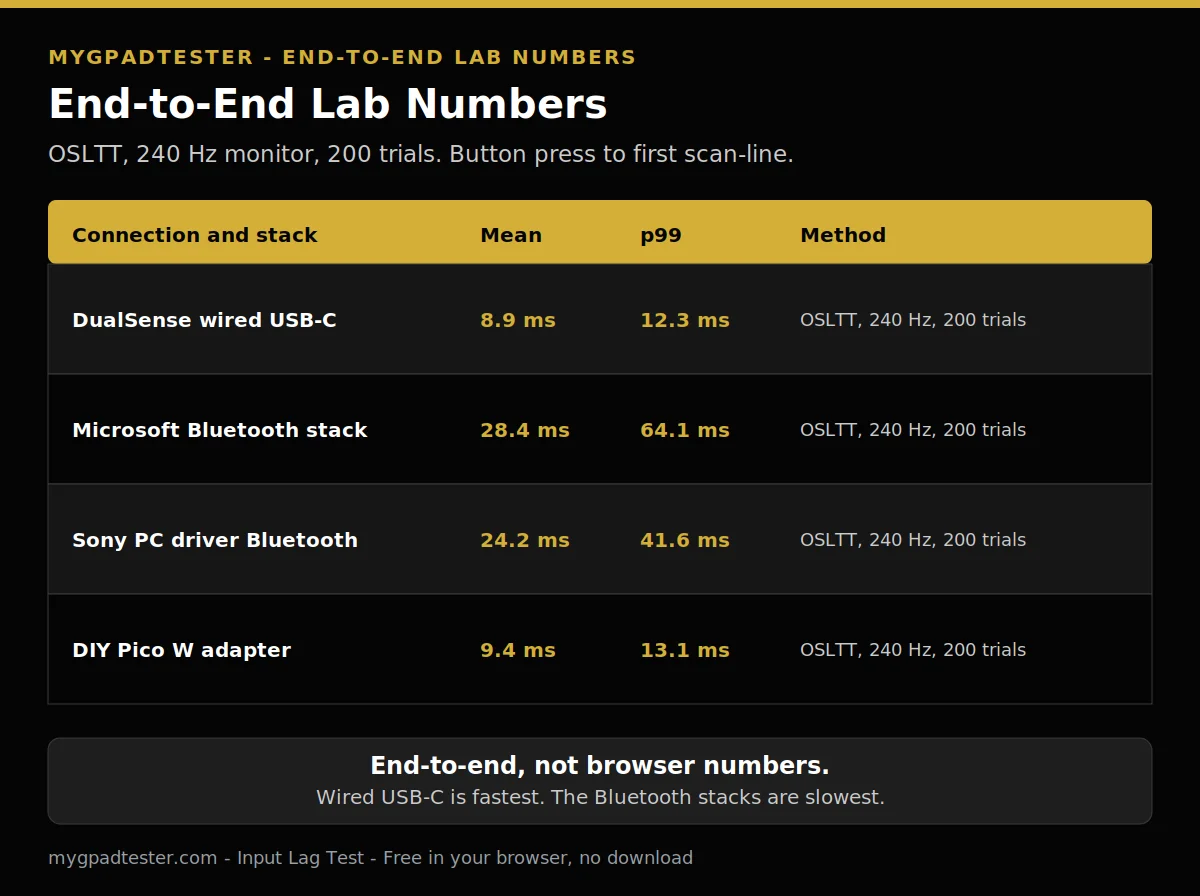
| Connection and stack | Mean | 99th percentile |
|---|---|---|
| DualSense wired USB-C | 8.9 ms | 12.3 ms |
| Microsoft Bluetooth stack | 28.4 ms | 64.1 ms |
| Sony PC driver Bluetooth | 24.2 ms | 41.6 ms |
| DIY Pico W adapter | 9.4 ms | 13.1 ms |
Method B: a second bench from the same publisher, relay plus 240 Hz capture card, mean of 50 samples, end-to-end button-to-display.
| Connection | Mean | 99th percentile |
|---|---|---|
| Wired USB-C | 5.1 ms | 6.4 ms |
| Steam Input plus Bluetooth | 11.8 ms | 17.2 ms (Steam games only) |
The two wired means are both shown, with the note that the setups differ. The OSLTT bench uses a 240 Hz monitor and 200 trials. The relay bench uses a relay and a 240 Hz capture card with 50 samples. Compare within one block, never across blocks.
The per-game settings are in Best Polling Rate for FPS / Competitive Gaming.
Why does Bluetooth feel fine one minute and laggy the next?
Bluetooth feels uneven because interference and retransmissions cause spikes, so the average hides the moments that cost you. A weak signal forces the radio to send the same packet again, and each retry shows up as a spike in the reading.
Consistency matters as much as the average. A steady 8 ms feels better than 4 ms with spikes. A weak signal forces retransmissions, which show up as spikes. A shot that fires late after a clean run is a spike, not a slow average.
What about DualSense on PC, wired or Bluetooth?
On PC, a DualSense is faster and steadier wired at about 250 Hz than on Bluetooth at about 125 Hz, and Bluetooth also drops its adaptive trigger and haptic reports. The Windows Bluetooth stack delivers the reports in bursts with gaps, so wired is the clear choice on PC.
DualSense wired is about 250 Hz typical, Bluetooth about 125 Hz typical, more variable. The Windows Bluetooth stack drops DualSense adaptive trigger and haptic reports. One guide reports bursts of 500 to 800 Hz with 50 to 200 ms gaps on Windows Bluetooth. The full DualSense guide is in PS5 Controller Polling Rate Test Guide.
Does the Xbox Wireless Adapter beat Bluetooth?
Yes, the adapter beats Bluetooth on steadiness, because it runs a dedicated protocol instead of the shared Bluetooth stack, and no rate number is claimed for it. The adapter is steadier wireless, not a speed upgrade, and it does not change the pad’s 125 Hz rate.
Xbox wired and Bluetooth are about 125 Hz. The Xbox Wireless Adapter is steadier wireless than Bluetooth. No rate number is asserted for the adapter. The full Xbox limit is in Xbox Controller 125Hz Explained.
How do I test wired vs wireless myself, properly?
Test wired first as your baseline, then the dongle, then Bluetooth, with the same controller, same browser, and same test, changing one thing at a time. Compare the bands, not single numbers, and note the spikes, because the spikes are what you feel in a game.
- Test wired first, as the baseline.
- Test the dongle next, on the same controller.
- Test Bluetooth last, on the same controller.
- Use the same browser, the same test, and the same game for all three.
- Change one thing at a time.
- Compare bands, not single numbers.
- Note the spikes, and move away from routers and USB 3.0 hubs before you decide.
The HowTo block below mirrors these steps, for a smooth three-connection run of about 15 minutes. If the run needs a second round or a room change, the time and the wording change together.
How do I test wired vs wireless myself, properly?
Total Time: 15 minutes
Test wired first, as the baseline.
Test the dongle next, on the same controller.
Test Bluetooth last, on the same controller.
Use the same browser, the same test, and the same game for all three.
Change one thing at a time.
Compare bands, not single numbers.
Note the spikes, and move away from routers and USB 3.0 hubs before you decide.
Does my TV or monitor add more lag than the connection?
Yes, a TV or monitor can add far more lag than the cable versus wireless gap, so Game Mode and motion smoothing matter more than the connection. Fix the display first, then worry about the cable, because the display is the bigger link in the chain.
Display processing, Game Mode and motion smoothing, can add far more lag than the cable versus wireless gap. A browser latency test measures only the first piece of the chain, button to browser through the Gamepad API. It cannot see the game engine or the monitor. The PC fixes are in the reduce lag post, named in text only here and linked in Next Steps.
Related Tools
- Input Lag Test (pillar, highlighted)
- Polling Rate Test
- Button Test
- Trigger Test
- Vibration Test
- Stick Drift Test
- Stick Deadzone Test
- Gamepad Health Checker
Related Guides
- Best Budget Controllers With No Stick Drift
- Xbox vs PS5 Input Lag Comparison
- 125Hz vs 250Hz vs 500Hz vs 1000Hz Controller Polling Rate
- What Is Controller Input Lag
- How to Measure Controller Input Lag Online
- How to Check Controller Polling Rate
About the Author
Marcus Sterling, Lead Engineer and Founder of MyGpadTester, Austin, Texas. Profile: https://mygpadtester.com/marcus-sterling/ X: https://x.com/marcussterlin
Wired is the fastest connection, and the method decides the number. Compare bands, not single numbers, and name the method every time.
Frequently Asked Questions
Does low battery make Bluetooth lag worse?
Yes, in principle. A weak signal forces retransmissions, which show up as spikes. No battery percentage is given, because no source in this run gives one. Charge the pad and retest.
Does a USB hub slow the test?
A hub can add a hop between the pad and the PC, so plug the cable or the dongle into a direct port for the test. One change at a time, and the hub is a change.
Does Bluetooth drain the battery faster than wired?
A wireless device that transmits more often drains its battery faster, because more reports mean more events to process. No hour figure is given, because no controller battery figure was verified.
Why does my Bluetooth reading jump around?
Move away from Wi-Fi routers and USB 3.0 hubs, keep the pad close to the receiver, and retest. Compare the band, not the single best reading.
Can I use Bluetooth for casual games?
Yes. Bluetooth is fine for casual and story games, where a few ms and the odd spike do not cost you. Use wired or the dongle when the match matters.
What does the browser test actually measure?
Only the first piece of the chain, button to browser through the Gamepad API. It cannot see the game engine or the monitor, so never read a browser number as end-to-end input lag.
Wired is the fastest and steadiest connection. The dongle is close behind. Bluetooth is the slowest and least steady, and its delay comes in bursts. The method decides the number, so name it every time, and compare bands, not single numbers.
Next Steps
Test all three connections with the Input Lag Test, wired first, then the dongle, then Bluetooth. Read the Bluetooth lag fix post and the reduce lag post for the fix procedure. Read Xbox vs PS5 Input Lag Comparison, for the console comparison. Read Does Polling Rate Affect Gaming Performance?, for what polling changes. Read Best Polling Rate for FPS / Competitive Gaming, for the per-game settings.