Best Polling Rate for FPS / Competitive Gaming
Will a higher polling rate make you better at FPS? Do you need a new controller? Is 8000 Hz worth it, or is your 125 Hz Xbox pad too slow for competitive play? This post answers with a rate per game type, and nothing else to guess.
Last updated: 18 November 2026 | Category: Performance Optimization | Reading time: about 13 minutes | Tested with Chrome/Edge, Gamepad API
Quick Answer
1000 Hz is the standard recommendation for competitive FPS, and 125 Hz is fine for casual and story games. 4000 or 8000 Hz buys almost nothing on a controller, because the saving over 1000 Hz is under 1 ms. The rate is one link in the chain, not the whole of lag, so the screen and the game matter more.
Test your polling rate
No download. No account. Data stays in your browser.
Polling rate is how often your controller reports to the PC. The report interval is the gap between reports: 8 ms at 125 Hz, 1 ms at 1000 Hz. The rest of this post is the rate for your game type, and the reason each row fits.
What is the best polling rate for FPS games?
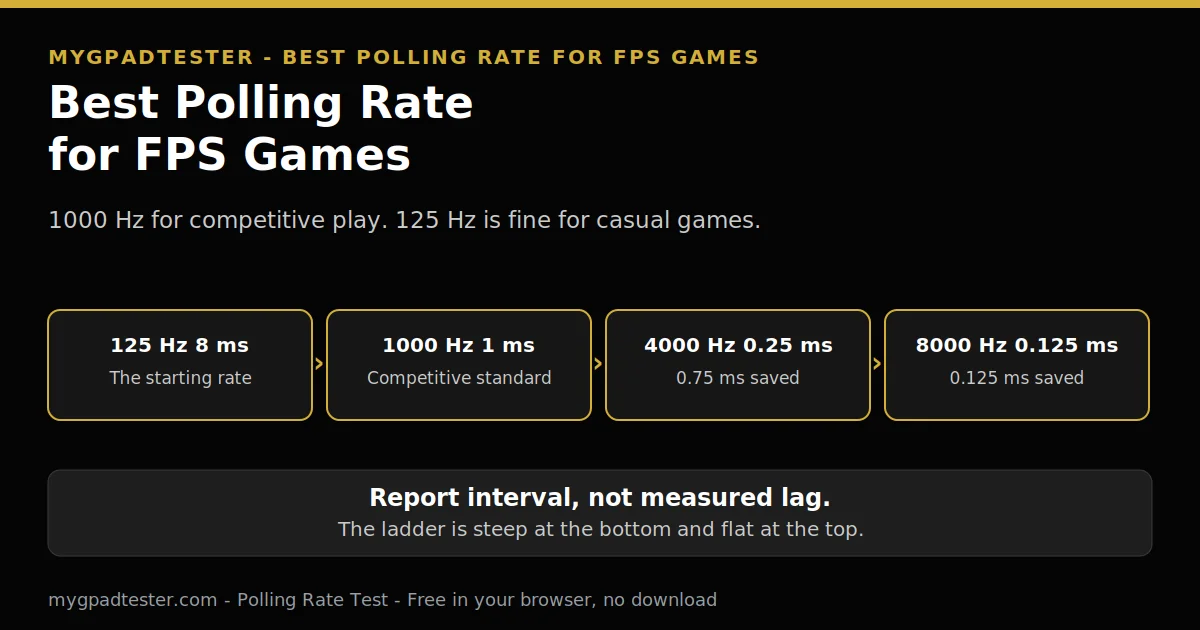
1000 Hz is the best polling rate for competitive FPS, and 125 Hz is fine for casual play. The reason is simple: a higher rate shortens the report interval between polls, but the saving shrinks fast after 1000 Hz, so competitive players stop there.
The ladder runs from 125 Hz at 8 ms to 1000 Hz at 1 ms, then to 4000 Hz at 0.25 ms and 8000 Hz at 0.125 ms. The biggest single jump is 125 Hz to 1000 Hz, which saves up to 7 ms worst case, about 3.5 ms on average. The full ladder is in the polling rate ladder post.
Is 1000 Hz enough, or do I need 4000 or 8000 Hz?
1000 Hz is enough for competitive play, because 4000 Hz saves only 0.75 ms of report interval over it, and 8000 Hz saves only 0.125 ms. Those savings are smaller than one frame on any screen, so no competitive player needs them.
4000 Hz and 8000 Hz are enthusiast ceilings, mostly mouse-derived, not controller targets. No mouse number is used in this post.

| Polling rate | Report interval | Saving over the previous step | Who feels it |
|---|---|---|---|
| 125 Hz | 8 ms | The starting rate | The baseline for Xbox pads |
| 250 Hz | 4 ms | 4 ms | A clear step up, felt in fast play |
| 500 Hz | 2 ms | 2 ms | A smaller step, felt in fast play |
| 1000 Hz | 1 ms | 1 ms | The competitive standard, Tier 3 baseline |
| 4000 Hz | 0.25 ms | 0.75 ms | Almost nobody feels the 0.75 ms |
| 8000 Hz | 0.125 ms | 0.125 ms | An enthusiast ceiling, not a target |
The full answer to whether polling rate changes performance is in Does Polling Rate Affect Gaming Performance?.
Does 1000 Hz help in every FPS game the same way?
1000 Hz helps the same way in every FPS game, because the saving is in the report interval, not in the game itself. Fast games show the saving more, because a missed shot costs more there, but the number does not change between games.
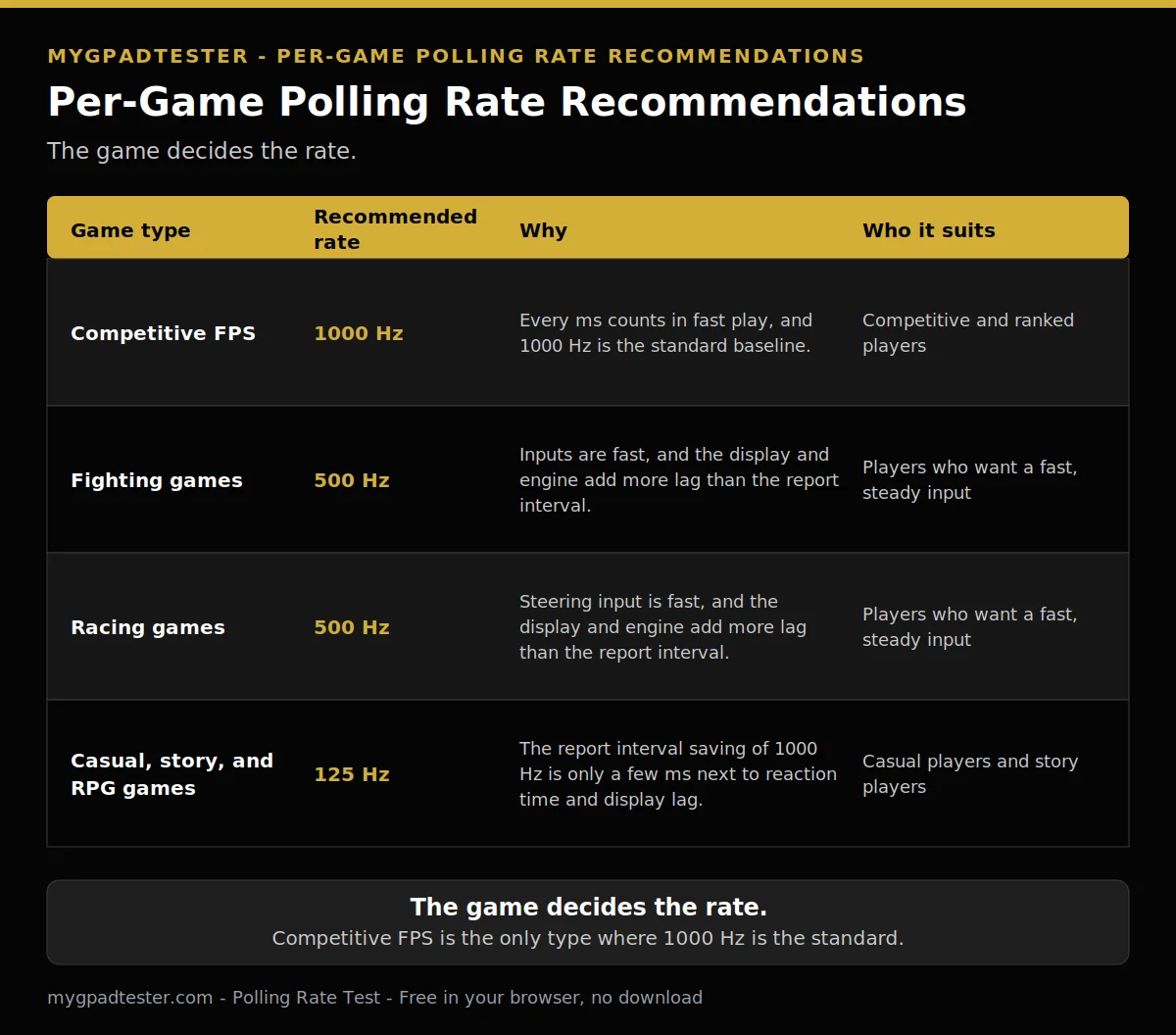
| Game type | Recommended rate | Why | Who it suits |
|---|---|---|---|
| Competitive FPS (Warzone, Apex, Fortnite, CS2, Valorant) | 1000 Hz | The report interval is 1 ms, so each report is fresh inside one frame | Competitive players who want the freshest report |
| Fighting games | 500 Hz | The report interval is 2 ms, fast enough for timing-heavy inputs | Players who want tight timing without chasing the top rate |
| Racing games | 500 Hz | The report interval is 2 ms, smooth enough for steering input | Players who want smooth steering without the top rate |
| Casual, story, and RPG games | 125 Hz | The report interval is 8 ms, and the game never asks for more | Players who play story and casual games |
If your game type is not in the table, use the closest row. A story game plays like a casual game. A ranked shooter plays like the competitive row.
Will a higher polling rate make my aim better?
No, a higher polling rate will not make your aim better, because it only shortens the report interval and does not change stick accuracy or deadzone. Aim improves with practice and a stable setup, not with a higher report rate.
Polling has no effect on stick accuracy, drift, deadzone, or wear. What improves aim is practice, a stable setup, and a deadzone that fits the stick. The performance question is answered in full in Does Polling Rate Affect Gaming Performance?.
Does my screen refresh rate change the answer?
Yes, your screen refresh rate changes how much of the saving you can feel, because a 60 Hz frame lasts 16.7 ms and a 7 ms saving sits inside one frame. The saving is still real, but it is small next to the frame time.
A 60 Hz screen shows a new frame every 16.7 ms. A 120 Hz screen shows one every 8.3 ms. A 144 Hz screen shows one every 6.9 ms. A 240 Hz screen shows one every 4.2 ms. A 360 Hz screen shows one every 2.78 ms. The benefit of a higher rate scales with refresh rate and frame rate, qualitatively, and the 240 Hz threshold is mouse-derived, Tier 3 qualitative only, never a controller measurement. Polling changes how fast an input is reported. It does not change frame rate. The full chain is in Does Polling Rate Affect Gaming Performance?.
What polling rate should I use for casual or story games?
125 Hz is fine for casual and story games, because the report interval saving of 1000 Hz is only a few ms and nothing in a slow game punishes it. Save the money and the setup time, and spend both on the game instead.
125 Hz to 1000 Hz saves up to 7 ms worst case, about 3.5 ms on average, assuming inputs arrive uniformly between polls. In a slow game nothing punishes that saving. If you do buy, check the budget picks guide for models that hold their rate without drift. The guide is linked in the FAQ below and in Related Guides.
Why does my browser test show a lower rate than my controller promises?
Your browser test shows a lower rate than your controller promises because the browser reading is gated by frame rate, not by the controller. On a 60 Hz display the test cannot show above 60 Hz, so the reading is browser observed, never a hardware certificate.
A browser result is browser observed, gated by frame rate. On a 60 Hz display a browser test cannot show above 60 Hz. The polling rate applies to the whole report, sticks, triggers, and buttons together. Test your rate with the Polling Rate Test, and read the ladder post for the full rate ladder.
How do I pick my polling rate in five minutes?
Pick your rate in five minutes by testing what you already have, checking your screen refresh rate, and playing one game at each setting. Change one thing at a time, and keep the setting that feels steadiest, not the one with the biggest number.
- Test your current rate first.
- Check your screen refresh rate.
- Play one game per setting.
- Change one thing at a time.
Keep the setting that feels steadiest, not the one with the biggest number.
What if my controller is stuck at 125 Hz?
If your controller is stuck at 125 Hz, it is usually normal, because Xbox first-party pads are firmware-locked to about 125 Hz and a DualSense on Bluetooth runs at about 125 Hz too. Wired, a DualSense runs at about 250 Hz, and a third-party pad needs its own specification checked per model.
Xbox first-party pads are firmware-locked to about 125 Hz. A DualSense on Bluetooth runs at about 125 Hz too. Wired, a DualSense runs at about 250 Hz. The Xbox limit is in Xbox Controller 125Hz Explained. The DualSense guide is in PS5 Controller Polling Rate Test Guide. A third-party pad needs its own specification checked per model. Never take a blanket 1000 Hz claim for a third-party pad.
Related Tools
- Polling Rate Test (pillar, highlighted)
- Button Test
- Vibration Test
- Trigger Test
- Stick Drift Test
- Stick Deadzone Test
- Input Lag Test
- Gamepad Health Checker
Related Guides
- Does Polling Rate Affect Gaming Performance?
- 125Hz vs 250Hz vs 500Hz vs 1000Hz Controller Polling Rate
- USB vs Bluetooth Controller Polling Rate
- Best Budget Controllers With No Stick Drift
- How to Reduce Controller Input Lag on PC
- PS5 Controller Polling Rate Test Guide
- How to Check Controller Polling Rate
- What Is Controller Polling Rate
About the Author
Marcus Sterling, Lead Engineer and Founder of MyGpadTester, Austin, Texas. Profile: https://mygpadtester.com/marcus-sterling/ X: https://x.com/marcussterlin
1000 Hz is the standard recommendation for competitive FPS. 125 Hz is fine for the rest. The table in this post is the short version of that rule.
Frequently Asked Questions
What polling rate do pro players use?
1000 Hz is the common baseline in the sources found for competitive play. No pro player survey was verified in this run, so no survey figure is claimed. The baseline is a guide and tool baseline, not a survey result.
Does a higher polling rate lower my FPS?
No. Polling rate changes how fast an input is reported, not how fast the game renders frames. Frame rate is a separate system, and a higher report rate does not slow the game down.
Should I buy a 1000 Hz controller just for FPS?
Only if the rest of your setup is already fast. On a 60 Hz screen with a slow game, the saving is a few ms inside a 16.7 ms frame. Spend on the screen or the game first, and check the budget picks guide if you do buy.
Does a higher polling rate drain the battery faster?
Yes, in principle. A wireless device that transmits more often drains its battery faster, because more reports mean more events to process. No hour figure is given, because no controller battery figure was verified.
Does polling rate affect stick drift or deadzone?
No. The stick still reports the same rest value, and the rate only changes how often that value is reported. Drift and deadzone are about the stick hardware and the deadzone setting, not the report rate.
What if my game caps at 60 fps?
The frame still lasts 16.7 ms, so the report interval saving sits inside one frame and the gain is small. That is the game cap, not the screen: a 120 Hz display does not change a 60 fps game cap. 1000 Hz still works, but the gain is small.
1000 Hz is the standard recommendation for competitive FPS, and 125 Hz is fine for casual and story games. 4000 Hz and 8000 Hz buy almost nothing on a controller. Test your rate, read the row for your game, and spend the money on the screen or the game first.
Next Steps
Test your controller with the Polling Rate Test. Read Does Polling Rate Affect Gaming Performance?. Read Xbox Controller 125Hz Explained, for the Xbox limit. Read Wired vs Wireless Controller Input Lag, Data Comparison, for the connection comparison. Read Xbox vs PS5 Input Lag Comparison, for the console comparison.