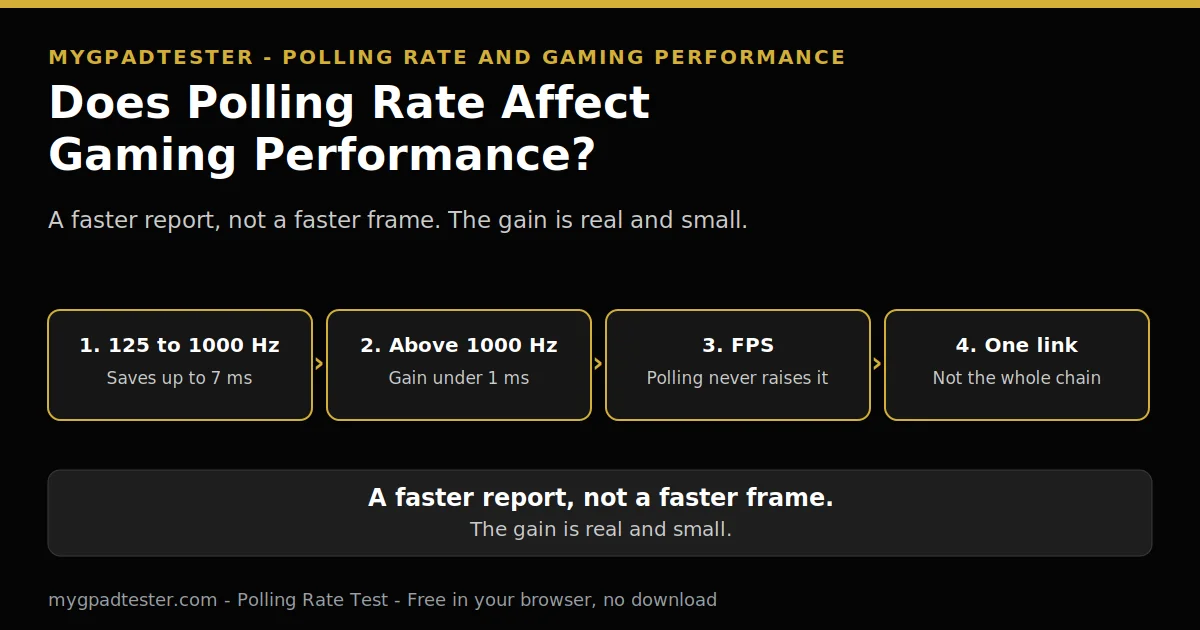
Does Polling Rate Affect Gaming Performance?
You hear that 1000 Hz is better, and 8000 Hz is better still. Your controller runs 125 Hz. Does that mean you are losing? Does a higher rate raise your FPS, sharpen your aim, or fix a slow game? The short answer is smaller than the hype. A higher rate reports your input sooner, and that is all it does.
Last updated: 17 November 2026 | Category: Performance Optimization | Reading time: about 15 minutes | Tested with Chrome/Edge, Gamepad API
Quick Answer
Yes, polling rate affects how fast an input is reported, but it does not change your FPS. Moving from 125 Hz to 1000 Hz saves up to 7 ms of report interval. Above 1000 Hz the gain is under 1 ms, and the rate is only one link in a longer input lag chain.
Test your polling rate
No download. No account. Data stays in your browser.
This post works out the gain in milliseconds, Tier 1 arithmetic, and places polling in the input lag chain next to frame time, display processing, and engine processing. No aim promise, no rank promise, and no mouse number appears here. Every figure is controller maths or a labelled Tier 3 typical.
Does polling rate affect gaming performance, yes or no?
Yes, it affects how fast an input is reported, and no, it does not change your frame rate. Polling rate is the report rate, measured in Hz. Report interval is its inverse, measured in ms. Input latency is the full chain, jitter is how much report timing varies, and browser measurement is what the browser observes, gated by frame rate.
Polling rate applies to the whole report, not to one control at a time, Tier 1 concept. Sticks, triggers, and buttons are reported together in each report. A faster rate reports the same stick flick, the same button press, and the same trigger pull sooner. It does not change what the stick reports, only how often the report arrives.
The full lag chain lives in the lag foundation post. That post owns the chain in full. Browser lag bands, controller-to-browser only, never end to end, are: under 8 ms excellent, 8 to 16 ms normal, above 16 ms investigate.
How much difference does 125Hz versus 1000Hz really make?
It saves up to 7 ms of worst-case report interval, about 3.5 ms on average. At 125 Hz a new report arrives every 8 ms, and at 1000 Hz every 1 ms. The gap between those two numbers is the saving, assuming inputs arrive uniformly between polls, Tier 1.
The worst case is an input that lands just after a report leaves. It sits for the full interval before the next report carries it. The average case is half the interval, because inputs land evenly across the gap. That is where 7 ms worst case and 3.5 ms average come from, Tier 1 arithmetic, with the uniform arrival assumption stated in the sentence.
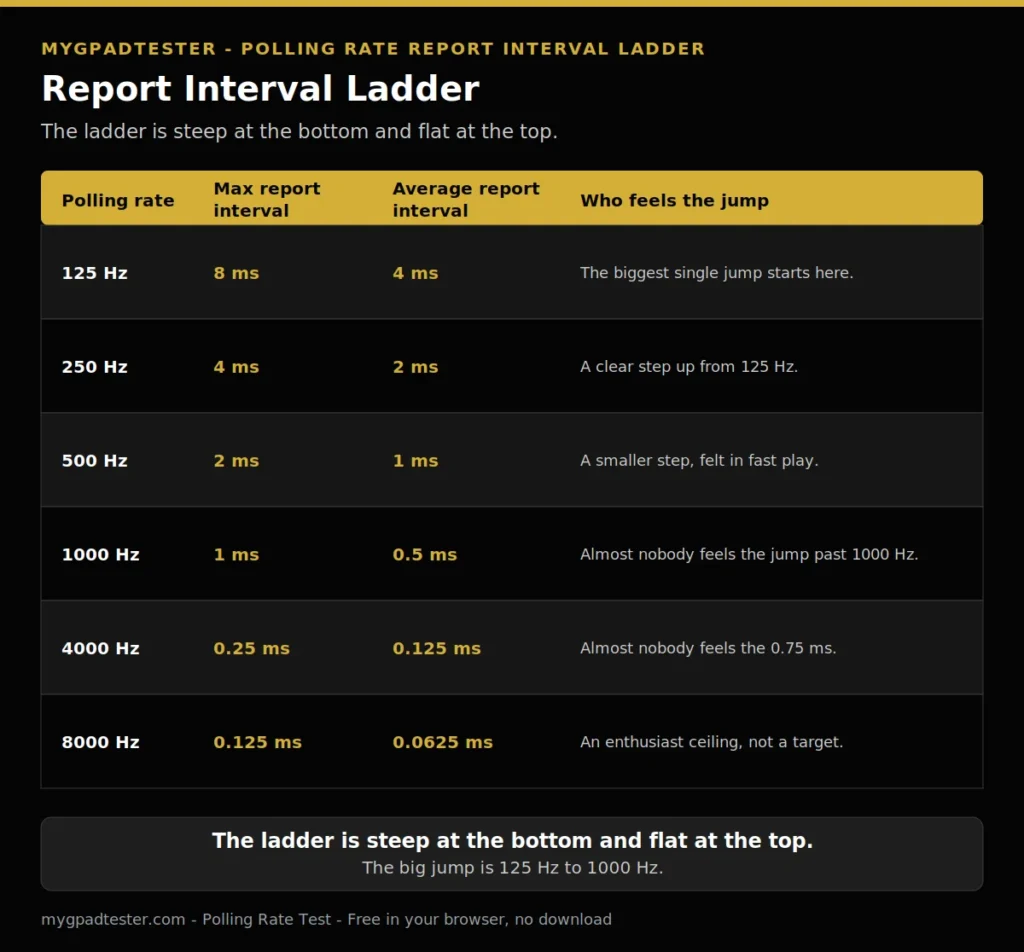
| Polling rate | Max report interval | Average report interval | Who feels the jump |
|---|---|---|---|
| 125 Hz | 8 ms | 4 ms | The biggest single jump starts here. |
| 250 Hz | 4 ms | 2 ms | A clear step up from 125 Hz. |
| 500 Hz | 2 ms | 1 ms | A smaller step, felt in fast play. |
| 1000 Hz | 1 ms | 0.5 ms | Almost nobody feels the jump past 1000 Hz. |
| 4000 Hz | 0.25 ms | 0.125 ms | Almost nobody feels the 0.75 ms. |
| 8000 Hz | 0.125 ms | 0.0625 ms | An enthusiast ceiling, not a target. |
The full ladder lives in the polling ladder post. That post owns the general ladder. This post uses the ladder as a worked example with the savings quantified, and links to it.
Does a higher polling rate raise my FPS?
No, polling rate never raises FPS, because reporting an input and rendering a frame are two different systems. Polling rate changes how fast an input is reported. Frame rate is how fast the game renders frames. One number cannot change the other, because they measure different things.
Frame intervals, Tier 1: 60 Hz is 16.7 ms, 120 Hz is 8.3 ms, 144 Hz is 6.9 ms, 240 Hz is 4.2 ms, 360 Hz is 2.78 ms. A faster report interval cannot shorten a frame interval. The game still renders one frame per interval, and the report still arrives inside that frame. Polling and refresh are independent variables, house rule. Never state a rule that one should be higher than the other.
If your FPS is low, the fix sits in the render side: resolution, settings, and the graphics card. A higher polling rate does not touch any of those. It only moves the input report earlier inside the frame you already have.
Where does polling rate help most, and where does it not matter?
It helps most where the frame rate and the refresh rate are already high, and it matters least where the display or the game is the bottleneck. A fast display shows each frame sooner, so a sooner report reaches the screen sooner. A slow display holds every report inside one long frame, so the gain hides.
Polling is one link in the input lag chain, not the whole chain. Frame time, display processing, and engine processing sit in the same chain. No single end-to-end latency number is claimed from any one number, house rule, R1 and R2.
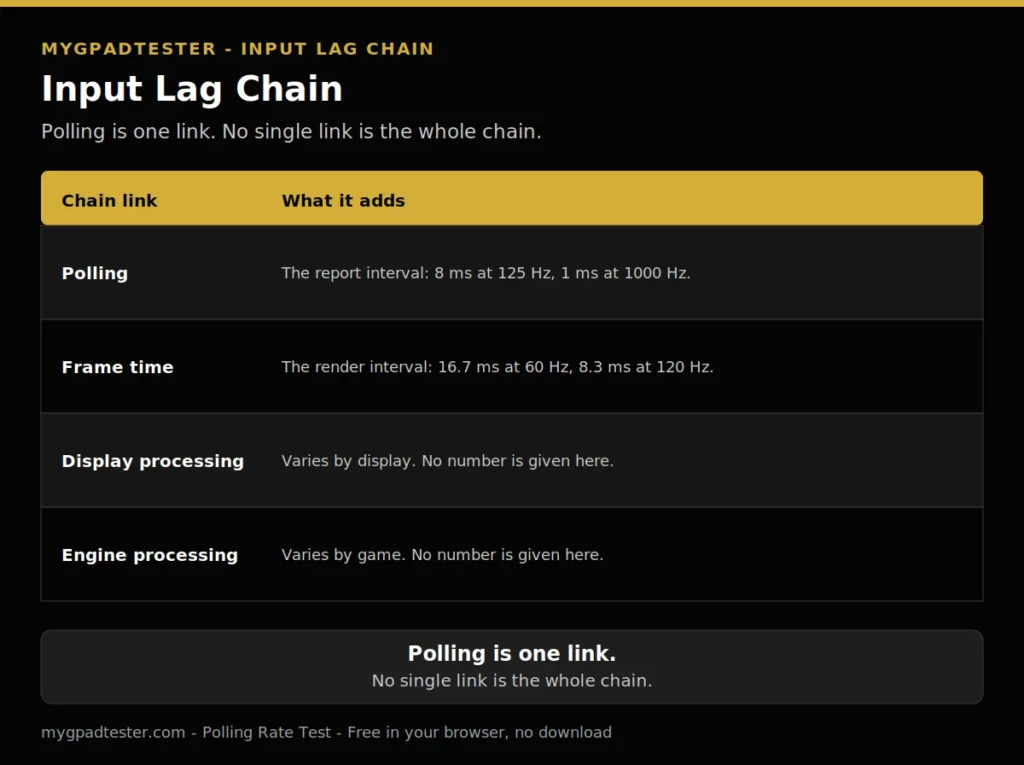
| Chain link | What it adds |
|---|---|
| Polling | The report interval: 8 ms at 125 Hz, 1 ms at 1000 Hz. |
| Frame time | The render interval: 16.7 ms at 60 Hz, 8.3 ms at 120 Hz. |
| Display processing | Varies by display. No number is given here. |
| Engine processing | Varies by game. No number is given here. |
The benefit of a higher rate scales with refresh rate and frame rate, qualitatively. Mouse guides treat the gain as below perception below about 240 Hz, but that threshold is mouse-derived, labelled Tier 3, never a controller measurement. For controllers the honest wording stays qualitative: a faster display and a faster game let the sooner report show, and a slower display or game hides it.
Will 1000Hz make my aim better?
No, 1000 Hz alone does not make your aim better, because aim depends on the whole chain, not on one link. A faster report interval reports the same stick movement sooner. It does not make the sensor more accurate, and it does not fix bad mechanics, Tier 1 concept.
Aim is a chain too. The stick reports the position, the game reads the report, the frame renders, and the display shows it. A sooner report shortens one step. It does not steady a shaky hand, it does not correct a wrong sensitivity, and it does not change the deadzone. No aim, skill, or rank improvement claim is made here.
The rate applies to the whole report, Tier 1 concept. A stick flick, a button press, and a trigger pull travel in the same report. None of them gets a faster lane than the others. The gain is the same for every control on the pad.
Is 1000Hz enough, or do I need 4000Hz or 8000Hz?
1000 Hz is enough for almost everyone, because the jump to 4000 Hz saves 0.75 ms and to 8000 Hz saves 0.125 ms. Those savings sit inside one frame on most displays, so almost nobody feels them. 1000 Hz is the baseline most guides treat as standard, Tier 3, not a vendor specification.
The maths is Tier 1: 1000 Hz to 4000 Hz saves 0.75 ms worst case, and 4000 Hz to 8000 Hz saves 0.125 ms worst case. The benefit shrinks steeply after 1000 Hz. Each step up buys less than the step before it, and the price is more reports for the system to process.
8000 Hz is an enthusiast ceiling, not a target. Do not buy hardware to chase it, and do not set it as a goal. The established baseline is 1000 Hz, and the jump from 125 Hz to 1000 Hz is where the real saving sits.
Do I need a high refresh rate monitor to feel it?
A higher refresh rate makes the gain easier to feel, but it does not change the size of the gain. A 60 Hz display draws a frame every 16.7 ms, and a 240 Hz display every 4.2 ms, Tier 1. The saving stays the same, and the frame only decides how soon you see it.
On a 60 Hz display the report interval gain is still real, but a 16.7 ms frame means the gain sits inside one frame, so you will rarely feel it. It never says nothing changes, because the 125 Hz to 1000 Hz jump still saves up to 7 ms of report interval.
A browser result is browser observed, gated by frame rate, Tier 1 concept. On a 60 Hz display a browser test cannot show above 60 Hz. The browser reading names the display limit first, not the controller limit. Test on the display you play on, and read the number for that display.
What does a higher rate cost: CPU, battery, stutter?
A higher rate costs a little CPU load and, on wireless, a little battery, and the cost rises as the rate rises. More reports per second means more events for the operating system to process, Tier 1 concept. A wireless device that transmits more often drains its battery faster, with no number attached.
The cost stays qualitative here, with no percent and no hour figure, because no controller figure was verified. Mouse CPU and battery numbers are excluded from this post, H5. The mechanism is enough: more reports means more events to process, and more wireless transmissions means faster battery drain. At 1000 Hz the cost is small. At 8000 Hz it is larger, and the gain is smaller, so the trade gets worse in both directions.
If a game stutters after you raise the rate, lower it back and retest. The rate is one variable, and the retest names it. The settings that reduce lag live in the reduce lag on PC post. That post owns the settings layers, and this post does not repeat them.
What polling rate should you use?
Use 1000 Hz wired if your controller supports it, and use what your controller natively supports if it does not. The right rate follows the controller, not the other way round. A controller that natively runs 125 Hz needs no upgrade to play well, and a controller that supports 1000 Hz wired gives you the baseline in one step.
| Play style | Suggested rate |
|---|---|
| Casual and story games | Your controller native rate. 125 Hz is fine here. |
| Competitive FPS, wired | 1000 Hz if your controller supports it. |
| Fighting games, wired | 1000 Hz if your controller supports it. |
| Wireless play | Your controller native rate. Battery cost rises with the rate. |
This table is a short recommendation, not a per-game settings table. Per-game FPS settings belong to the Day 16 post, Best Polling Rate for FPS / Competitive Gaming. That post owns the per-game settings, and this post does not rebuild them.
Quick checklist: decide the rate in four checks
Work the list in order. Tick each step as you go.
- Check your refresh rate. Read the display rate first.
- Check your frame rate. Read the game frame rate second.
- Check your connection. Wired holds the rate steadiest.
- Decide. Pick the rate the controller supports, then retest once.
If the game feels the same after the change, the bottleneck sits elsewhere in the chain. Do not chase a higher rate to fix a display or engine limit.
Related Tools
- Polling Rate Test (pillar, highlighted)
- Button Test
- Vibration Test
- Trigger Test
- Stick Drift Test
- Stick Deadzone Test
- Input Lag Test
- Gamepad Health Checker
Related Guides
- What Is Controller Input Lag?
- 125Hz vs 250Hz vs 500Hz vs 1000Hz Controller Polling Rate
- How to Reduce Controller Input Lag on PC
- USB vs Bluetooth Controller Polling Rate
- Best Polling Rate for FPS / Competitive Gaming.
About the Author
Marcus Sterling, Lead Engineer and Founder of MyGpadTester, Austin, Texas. Profile: https://mygpadtester.com/marcus-sterling/ X: https://x.com/marcussterlin
Polling is one link in a chain. This post measures that link, and leaves the rest of the chain where it belongs.
Frequently Asked Questions
My game caps at 60 FPS, does polling rate matter?
The report interval gain is still real, but a 16.7 ms frame means the gain sits inside one frame, so you will rarely feel it. The 125 Hz to 1000 Hz jump still saves up to 7 ms of report interval, Tier 1.
Does polling rate affect Bluetooth controllers the same way?
The rate applies the same way, but Bluetooth is about 125 Hz, lower and more variable, Tier 3, so the ceiling is lower. Wired holds the higher rate steadiest.
Is 8000Hz worth it for a controller?
No, it is an enthusiast ceiling, not a target. The jump from 4000 Hz to 8000 Hz saves 0.125 ms, Tier 1. 1000 Hz is the established baseline.
Does a higher polling rate wear out my controller faster?
No evidence was found that it wears the stick or buttons faster. The pad sends the same data, and the rate only changes how often it is reported. The cost is battery on wireless, not wear. Tier 3 reasoning, labelled.
Why do some games feel the same at 125Hz and 1000Hz?
Because the display, the frame rate, and the engine sit in the same chain, and one link cannot fix the others. Polling is one link, not the whole chain.
Does polling rate change trigger or stick response time specifically?
No. The rate applies to the whole report, so sticks, triggers, and buttons are reported together, Tier 1 concept.
Polling rate is one link in a chain, and the chain decides how much it matters. The jump from 125 Hz to 1000 Hz saves up to 7 ms, and above 1000 Hz the gain is under 1 ms. The rate never changes FPS, never promises better aim, and never fixes a slow display or a slow game. Use the rate your controller supports, test it once, and move on.
Next Steps
Open the Polling Rate Test and read your rate wired first. For the Xbox limit, use Xbox Controller 125Hz Explained. For the overclocking procedure, use Controller Polling Rate Overclocking Guide. For per-game FPS settings, use Best Polling Rate for FPS / Competitive Gaming.