
Works in one game, dead in the next?
Last updated: 15 November 2026 | Category: Controller Issues & Fixes | Reading time: about 13 minutes | Tested with Chrome/Edge, Gamepad API
Quick Answer
If the controller works in one game but not another, the fault points at that game, its settings, or the translation layer, not the controller. Test the layers in order: operating system, browser tester, Steam, then the game. The layer that fails names the fault.
run the per-component health check
No download. No account. Data stays in your browser.
A controller passes through layers before a game ever sees it: operating system, browser tester, Steam, then the game. A fault in any one layer looks like a broken controller from inside the game. Test the layers in order, and the layer that fails names the fault. Press any button to wake the Gamepad API. A blank test before any press is normal. Chrome and Edge are the reference browsers for testing. Firefox has basic support, and Safari and mobile have limited support.
One game or all games: the core fork
One game failing while others pass points at that game, its settings, or the translation layer. A fault in every game points at the controller or the layers below it. Test the layers, and let the failing layer name the fault.
A pass in one game proves the controller sends input. A pass in the browser tester clears the operating system and the controller input path for that test. The browser cannot test what the operating system does not see. Fix the OS connection first, then retest in the browser. For the OS layer, see the OS detection fixes.
Bluetooth is one layer in this chain, covered in full by How to Test a Bluetooth Controller in Browser.
| Symptom | Layer it points at | Next check |
|---|---|---|
| One game fails, others pass | That game, its settings, or the translation layer | Check in-game settings, then the per-game override |
| Menus pass, game fails | The game or its input settings | Check in-game settings, then the Steam Input translation layer |
| Windows test and Steam pass, one game fails | That one game or its settings | Check that game’s settings first |
| One control fails everywhere | Hardware, one control | Retest, then cross-test |
| One browser tester fails only | That tester layer, not proof | Retest in the same browser, then cross-test |
One layer failing while the others pass names the layer, not the controller.
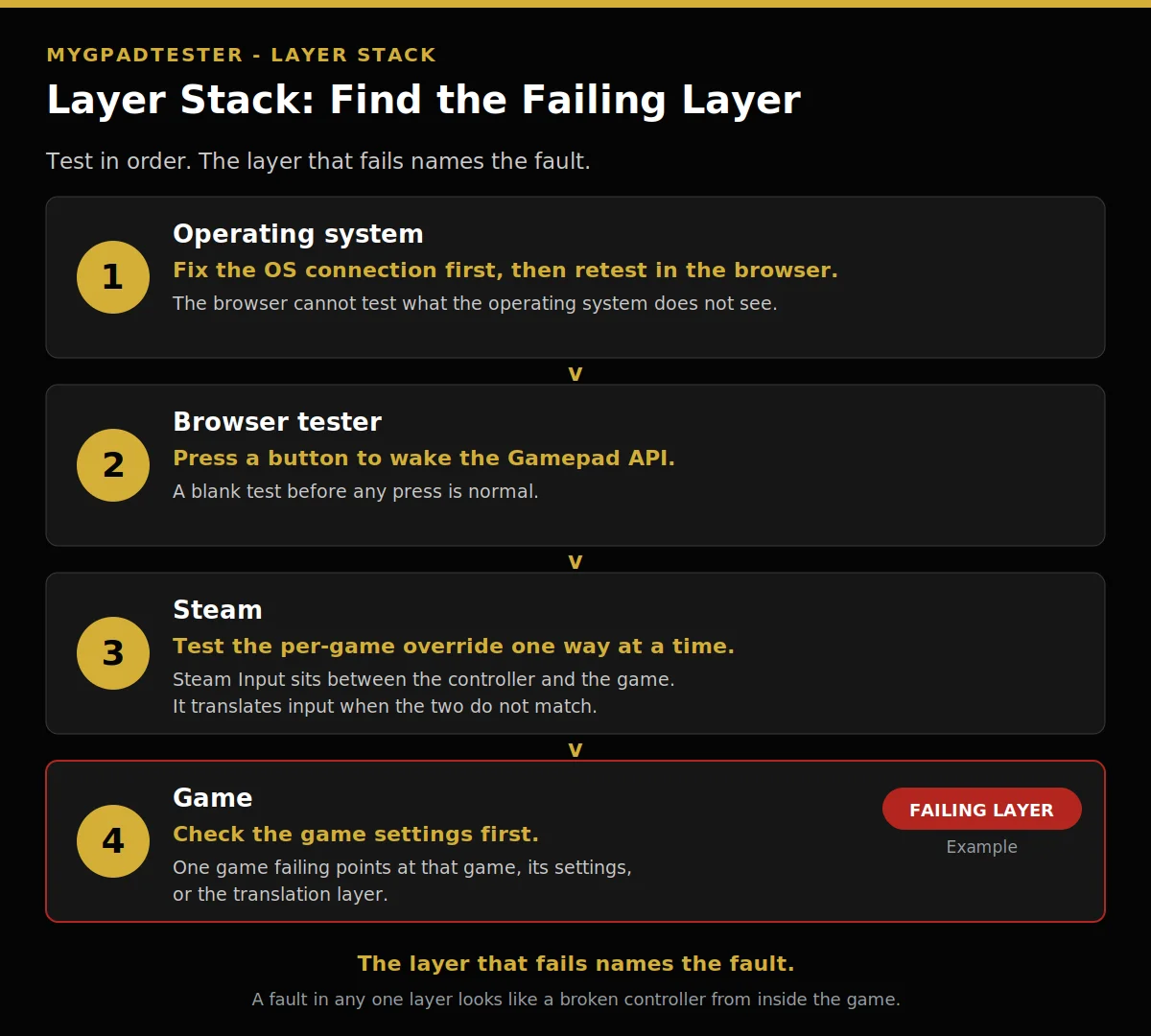
- Operating system: fix the OS connection first, then retest in the browser.
- Browser tester: press a button to wake the Gamepad API.
- Steam: test the per-game override one way at a time.
- Game: check the game settings first.
In the visual, the Game row carries the FAILING LAYER badge as an example. A fault in any one layer looks like a broken controller from inside the game.
Menus work, the game does not
A pass in menus means the controller and the operating system pass for that input path. The fault sits in the game or its settings. Check the game settings first, then the translation layer. Do not blame the controller yet.
Check the in-game input settings, then any controller preset or profile, then the Steam Input layer below.
Windows test and Steam pass, one game fails
A pass in the Windows test and in Steam clears the controller, the operating system, and Steam for that test. The fault sits in that one game or its settings. Check that game first. Do not start with a driver change.
Check the controller input setting first, then the deadzone or sensitivity setting where the game offers one. Then test the per-game Steam Input override, covered below. Retest with the same reading, browser, and connection, before and after each change, one variable at a time.
One control fails everywhere
One button, stick, or trigger failing in every tester and every game points at hardware. The fault follows the control, not the game. Test that control on its own, in the same browser on the same connection, and record the reading.
For one button, test every button once, slowly, in order. For the full symptom detail, see the nine signs.
For one trigger, read the trigger axis: 0.00 to 1.00, a tester convention, never a vendor specification. Rest above 0.02 needs a check, and full pull below 0.98 needs a check.
For one stick, use the house drift scale, a tester convention every time, never a vendor specification. Flickers within 0.02 to 0.03 is normal noise, no fix needed. A steady offset of 0.05 to 0.10, same direction, is mild drift.
A steady offset above 0.10, or creeping in one direction, is clear drift. Random jumps, even untouched, mean debris, a loose stick, or a failing sensor. Test flat and untouched for 30 to 60 seconds, and record stick, direction, value, connection, and browser.
A wider deadzone hides a small offset, but it does not fix drift. Resting plus 0.01 and outer 0.95 to 0.98 are starting guides, tester guides, never vendor specifications. Set the deadzone per stick separately. Calibration is a check, not a promised fix.
Why Does My Controller Drift Without Touching It? covers drift with hands off.
The cross-test: prove it in order
Swap one thing at a time, and the swap that moves the fault names the faulty part. Test the same controller on another system, then another controller on this system. Run this check first, before any driver or firmware change.
Swap the system, keep the controller, same browser, same connection type. If it passes there, the fault sits in the first system. If it fails there too, the controller stays the suspect.
Swap the controller, keep the system, same browser, same connection type. If the second controller passes, the first is the suspect. If it fails the same way, the controller is not the fault.
Health is a composite, not a single score: pass or fail per part, for sticks, buttons, triggers, vibration, and connection. For the full check, see what a health test actually is.
| Step | Check | What a pass rules out |
|---|---|---|
| 1 | Retest in the same browser and connection, one variable at a time | A one-off reading |
| 2 | Same controller on another system | This system and its settings |
| 3 | Another controller on this system | The controller, when the second one passes |
| 4 | Health check, pass or fail per part | Single-part fault vs many failed parts |
| 5 | Per-game override, one way at a time | The translation layer, Steam games only |

- Same controller, another system.
- Another controller, this system.
Steam Input vs native support
Steam Input can break a game that has native support, and it can fix a controller that needs translation. Test the per-game override one way at a time, and restore it if the controller needs it. One game’s example proves nothing about every game.
Steam Input sits between the controller and the game, and translates input when the two do not match. Native support means the game reads the controller directly, with no translation layer.
Right-click the game in the Steam Library, open Properties, then Controller, and set the override to Disable Steam Input or Enable Steam Input.
This guidance is Tier 3, not a rule for every game. For an XInput controller with native support, test disabling Steam Input. For a DirectInput controller, enable Steam Input so Steam can translate it. Controllers that need Steam Input, such as the Steam Controller, may stop responding if it is disabled.
The menu path above comes from one game’s Steam news post on controller settings, for PSI Masquerade Deadly Wonderland. The post calls its settings examples that may work, with compatibility not guaranteed for all controller models. It is one game’s post, not a general Valve document.
Restore the setting if the controller needs it (Tier 3 guidance).
DirectInput vs XInput, the old-game fork
An old game may not recognise a new controller, and a DirectInput device may register as nothing in an XInput-only game. Layouts differ, so the game may never see the input. Check which API the game expects before you blame the controller.
The facts here are Tier 3, from trade press sources that agree. XInput is a Microsoft controller API from 2005, with the Xbox 360, fixed Xbox layout, maximum of 4 controllers.
DirectInput is an older API from 1995, flexible, with no fixed layout, deprecated by Microsoft but still shipped in Windows for compatibility. It is used by older games, fight sticks, racing wheels, and flight sticks.
Enable Steam Input to translate a DirectInput device. For an XInput controller with native support, test disabling it, as above.
No controller option in settings
A missing controller option suggests the game may not support controllers, but it does not prove it until checked. Support is a per-game fact, never assumed. Check that game’s store page and settings at the time of reading, and judge only that game.
If the store page and settings show no controller support, the game may not support controllers at all.
When to stop and call it hardware failure
Stop when one control fails in every layer even after the retest rule, or many components fail the health check, and the cross-test points at the controller. You have proof now, not a guess. The next fork is repair vs replace. This post gives no repair steps.
The deadzone stop rule is 0.20, a tester guide, never a vendor specification. When that guide is reached and the fault remains, stop raising the deadzone. Many failed components point at replacement, one failed component at repair or a single fix.
The fork ends at repair vs replace, with proof: the layer, the control, and the cross-test result.
Limitations
This post names the faulty layer, but it cannot name a fault in a named game without checking it. It cannot certify hardware from a browser reading. It cannot replace a repair check for a faulty controller. Use it to find the layer first.
Troubleshooting
Match your symptom to the first check below, and start there. Each row points back to the section that owns the full check. Do not skip ahead to a driver or firmware change before the row for your symptom has been tested.
- Works in one game only: the core fork section.
- Works in menus only: the menus section.
- One control fails everywhere: the one control section.
Related Tools
- Polling Rate Test
- Vibration Test
- Trigger Test
- Stick Drift Test
- Stick Deadzone Test
- Button Test
- Input Lag Test
- Gamepad Health Checker (pillar, highlighted)
Related Guides
- Signs Your Controller Is Failing or Dying
- What Is a Controller Health Test and What Does It Check?
- Gamepad Not Detected by Browser? Fix It in 5 Minutes
- Why Does My Controller Drift Without Touching It?
- How to Test a Bluetooth Controller in Browser
About the Author
Marcus Sterling, Lead Engineer and Founder of MyGpadTester, Austin, Texas. Profile: https://mygpadtester.com/marcus-sterling/ X: https://x.com/marcussterlin
Test layer by layer. The layer that fails names the fault.
Frequently Asked Questions
My controller works in one game but not another. Is it broken?
No. It points at that game, its settings, or the translation layer.
It works in menus but not in the game. What does that mean?
The controller and the operating system pass for that input path. The fault sits in the game or its settings.
Could Steam Input be breaking a game with native support?
Yes, it can. Disable Steam Input for that game, then retest. Restore the setting if the controller needs it. One game’s example does not prove every game behaves the same.
Could it be DirectInput vs XInput?
Yes, for old games. XInput is from 2005, fixed Xbox layout. DirectInput is from 1995, flexible layout (Tier 3, trade press). An old game may miss a pad that uses the other API.
The game has no controller option. Does it support controllers?
Maybe not. Check that game’s store page and settings. A missing option is evidence, not proof, until checked.
When do I stop troubleshooting and call it hardware failure?
Stop when one control fails in every layer, or many components fail the health check, and the cross-test points at the controller. Then the fork is repair vs replace.
Does a failed test in one browser tester mean the controller is dead?
No. One layer is not proof. Retest in the same browser and connection, then cross-test.
Next Steps
If the fault sits in one game, check its settings and the per-game override, then retest. If one control fails everywhere, cross-test before any driver or firmware change.