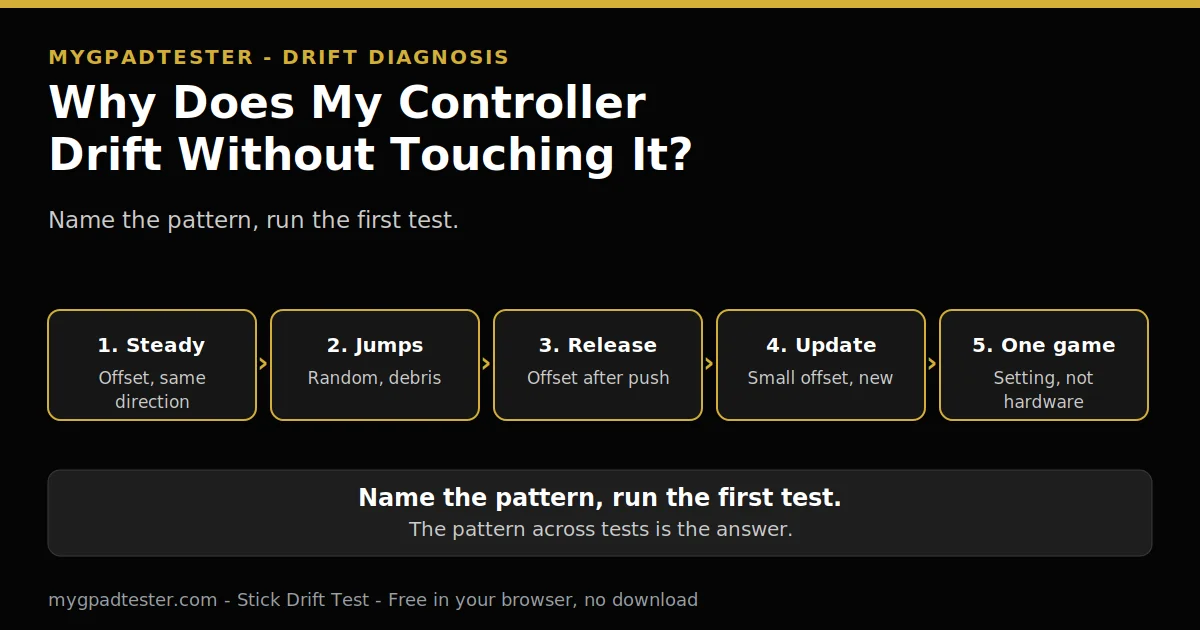
Your character keeps moving and your hands are nowhere near the sticks? The camera pans in menus, the aim pulls sideways, and you did nothing at all. The stick is reporting movement while untouched, and one test names which cause it is.
Last updated: 13 November 2026 | Category: Controller Issues & Fixes | Reading time: about 8 minutes | Tested with Chrome/Edge, Gamepad API
Quick Answer
Rest drift means the stick reports movement while untouched, so the fault is in the stick or its reading, not in the game. The usual causes are worn sensors, debris, a weak return spring, or a calibration offset. One test, flat and untouched for 30 to 60 seconds, names the pattern, and the pattern names the cause.
Run the drift test
No download. No account. Data stays in your browser.
Rest drift, in plain words
Rest drift means the stick reports movement while untouched, so the fault is in the stick or its reading, not in the game. One test, flat and untouched for 30 to 60 seconds, names the pattern: steady offset, creeping offset, random jumps, or one-direction pull. Each pattern below points at a different cause.
What drift is explains the fault itself. The drift test method owns the method in depth, and this post does not re-teach it. A steady offset matters more than a single flicker. Flickers within 0.02 to 0.03 are normal noise on the house drift scale, labelled tester convention every time, never a vendor specification. A steady offset of 0.05 to 0.10 is mild. Above 0.10 or creeping is clear drift.
Press any button to wake the Gamepad API. A blank test before any press is normal. The browser cannot test what the operating system does not see. Fix the OS connection first, then retest in the browser.
This post is a diagnosis post, not a fix guide. Every cause below ends at its first test. The fix lives in the owning post, linked in the table. The nine-sign symptom map owns the wider picture.
Seven patterns, seven first tests
Seven patterns, one row each. Each row gives the pattern, what it usually means, and the first test to run. Run the test before you decide anything. No fix steps in this table.
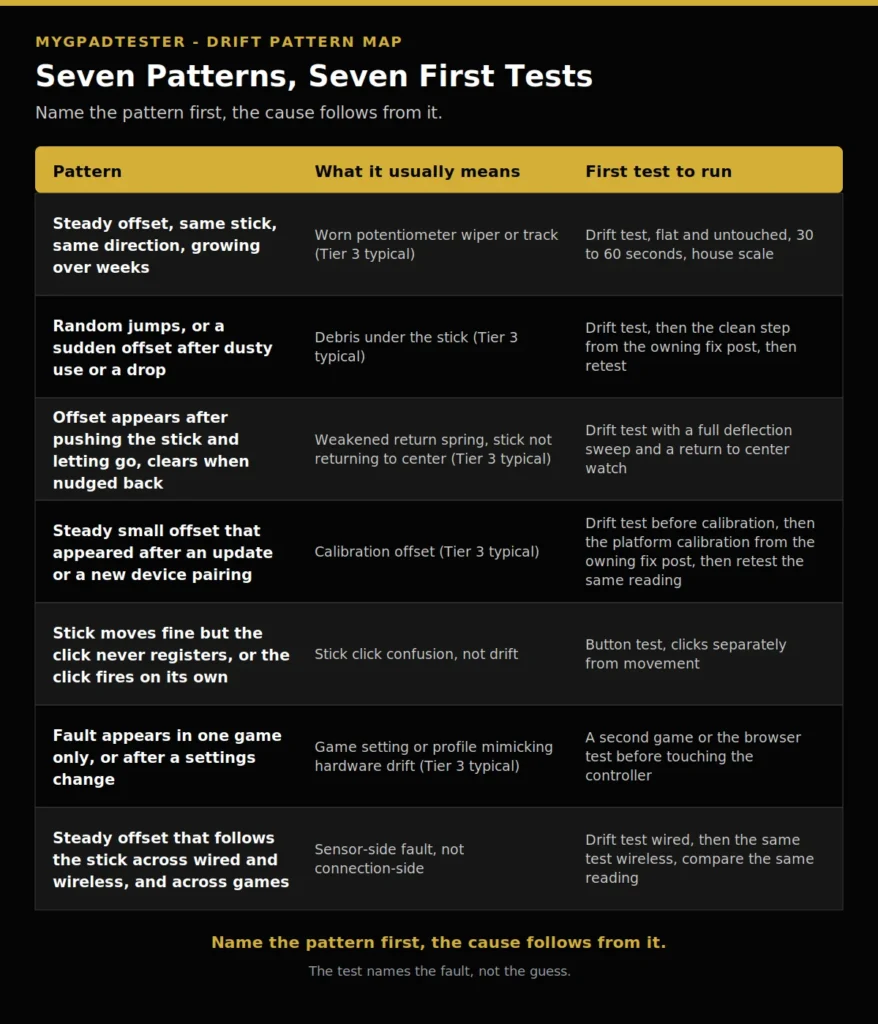
| Pattern | What it usually means | First test to run |
|---|---|---|
| Steady offset, same stick, same direction, growing over weeks | Worn potentiometer wiper or track (Tier 3 typical) | Drift test, flat and untouched, 30 to 60 seconds, house scale |
| Random jumps, or a sudden offset after dusty use or a drop | Debris under the stick (Tier 3 typical) | Drift test, then the clean step from the owning fix post, then retest |
| Offset appears after pushing the stick and letting go, clears when nudged back | Weakened return spring, stick not returning to center (Tier 3 typical) | Drift test with a full deflection sweep and a return to center watch |
| Steady small offset that appeared after an update or a new device pairing | Calibration offset (Tier 3 typical) | Drift test before calibration, then the platform calibration from the owning fix post, then retest the same reading |
| Stick moves fine but the click never registers, or the click fires on its own | Stick click confusion, not drift | Test the stick click, clicks separately from movement |
| Fault appears in one game only, or after a settings change | Game setting or profile mimicking hardware drift (Tier 3 typical) | A second game or the browser test before touching the controller |
| Steady offset that follows the stick across wired and wireless, and across games | Sensor-side fault, not connection-side | Drift test wired, then the same test wireless, compare the same reading |
A few rows deserve one more line, not a fix chain.
Worn potentiometer wiper or track is the usual cause of a steady offset. A potentiometer is a variable resistor that forms a variable voltage divider. Moving the stick moves a conductive wiper against a resistive contact pad, which varies the resistance and therefore the output voltage. The controller reads that voltage as a position. Two potentiometers per stick, one for X and one for Y (Tier 2, iFixit). The resistive contact pads wear down from friction, and once the resistance value of the neutral position changes, the controller reads a different voltage than expected while stationary and interprets it as input. That is drift (Tier 2, iFixit). Potentiometer wear is explained in depth in the Hall versus potentiometer post. A steady offset that grows over weeks, on the same stick, in the same direction, is the worn sensor pattern.
Debris under the stick gives random jumps, not a steady offset. Dust, skin cells and debris get under the stick skirt and interfere with the wiper. A sudden offset after dusty use or a drop fits debris. Cleaning helps debris, not worn hardware. Test first, clean, then retest the same reading.
A weakened return spring shows up after release. Push the stick, let it go, and watch where it lands. A stick that does not return to center reports an offset, and the offset clears when the stick is nudged back. Test with a full deflection sweep and a return to center watch. Snapback is different: the stick overshoots past center on return. That is a separate post, named here in one row only.
A calibration offset is a steady small offset that appeared after an update or a new device pairing, and calibration clears it. Test before calibration, then use the platform calibration from the owning fix post, then retest the same reading. One variable at a time. Calibration resets the center point. It does not repair worn hardware.
Stick click confusion is not drift. The stick moves fine but the click never registers, or the click fires on its own. Stick clicks are buttons, not drift, so test L3 and R3 separately from stick movement in the button test.
A game setting or profile can mimic hardware drift in one game and nowhere else. A deadzone setting, a stick preset, or a custom profile can shift the center in one game only. Test in a second game or in the browser test before touching the controller. If the fault follows the pad everywhere, it is the pad. If it stays in one game, it is the game. A deadzone setting gets one fork row only here; the deadzone settings posts own it. What a deadzone is explains the setting itself.
The connection layer is ruled out by pattern, not by guessing. Dropouts and stutter point at the connection, not at rest drift. A steady offset that follows the stick across wired and wireless, and across games, is sensor-side, not connection-side. Test wired first, then wireless, and compare the same reading. Jitter is described qualitatively only: wide, unstable, spikes and drops.
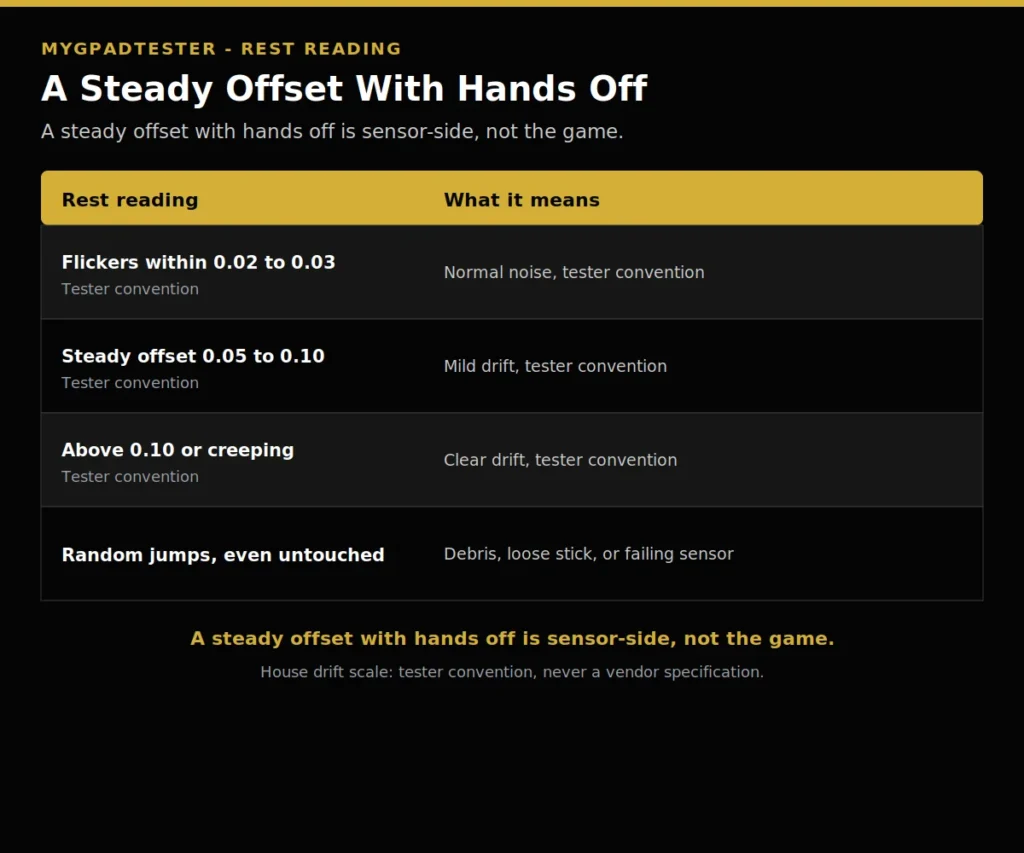
| Rest reading | What it means |
|---|---|
| Flickers within 0.02 to 0.03 | Normal noise, tester convention |
| Steady offset 0.05 to 0.10 | Mild drift, tester convention |
| Above 0.10 or creeping | Clear drift, tester convention |
| Random jumps, even untouched | Debris, loose stick, or failing sensor |
When the pattern does not match the test
The pattern says drift, but the drift test shows a clean rest reading. Trust the test, then check the run. A stick tested on a slope, a pad still waking up, or a game with a low deadzone setting can each fake drift. Test flat and untouched, 30 to 60 seconds, and retest before you decide.
The pattern says debris, but cleaning changed nothing. That points at wear, not dirt. A worn potentiometer track gives a steady offset again, even after the stick base is clean. Recheck the before and after numbers, calibrate, retest wired, and then use the repair versus replace decision.
The pattern changes between runs with nothing changed. Record the connection, the browser, and the battery state for each run. A fault that comes and goes with Bluetooth but never appears wired is a connection fault, not a dying pad. A fault that follows the pad across wired and wireless runs is the pad.
The Joy-Con drifts and the Switch Pro does not, or the other way round. That is a fault in that controller, not in the console. Test each controller on its own. The Joy-Con fix is the owning post for Joy-Con drift.
What this diagnosis cannot do
This post gives no fix chains. Every cause ends at its first test. The fix lives in the owning post, linked in the table. A post that fixes everything fixes nothing, because the reader cannot tell which step belongs to which fault.
This post gives no lifespan number anywhere. How long a controller lasts depends on use and care, and the patterns above matter more than a year count. That question is a separate future post.
A browser test reads through the Gamepad API, so every result here is browser observed. Test in Chrome or Edge, use the same browser for every retest, and keep the pad awake. No pattern here promises a diagnosis on its own. The pattern across the tests is the diagnosis.
Related Tools
- Polling Rate Test
- Vibration Test
- Trigger Test
- Stick Drift Test (pillar, highlighted)
- Stick Deadzone Test
- Button Test
- Input Lag Test
- Gamepad Health Checker
Related Guides
- What Is Controller Stick Drift?
- How to Test Stick Drift Online
- Hall Effect vs Potentiometer Joystick
- What Is Controller Deadzone?
- Nintendo Switch Joy-Con Drift Fix
- Signs Your Controller Is Failing or Dying
About the Author
Marcus Sterling, Lead Engineer and Founder of MyGpadTester, Austin, Texas. Profile: https://mygpadtester.com/marcus-sterling/ X: https://x.com/marcussterlin
One pattern is a clue. A pattern across tests is the answer. Run the first test, then read the pattern.
Frequently Asked Questions
Why does my controller drift without touching it?
Rest drift means the stick reports movement while untouched. The pattern names the cause: steady, creeping, random jumps, or one-direction pull.
Is it drift or is my game broken?
A fault in one game only points at a game setting or profile. The same offset in the browser test points at the stick.
Can a weak spring cause drift?
Yes. A stick that does not return to center reports an offset. Test with a full deflection sweep and a return to center watch.
Will cleaning fix drift that happens with hands off?
Cleaning helps debris, not worn hardware. Test first, clean, then retest the same reading.
My stick drifts after an update, what changed?
A calibration offset is the usual suspect. Recalibrate from the owning fix post, then retest the same reading.
Is this snapback?
No. Snapback is the stick overshooting past center on return. That is a separate post, named here in one row only.
Next Steps
If one pattern matched, open the owning post from the table and work its fix. If several patterns matched, run the full checkup linked at the top before you spend money. If the fault appears in one game only, check the game setting first. Do not buy a replacement until the tests name the fault.