Your stick draws a rounded square, not a circle. You push it around the edge and the trace comes back with flat sides and sharp corners. Is the stick worn out? That question is fair, and one bad trace does not answer it. This post explains what the trace means, how to test it right, and what to do next.
Last updated: 16 November 2026 | Category: Controller Testing Tools | Reading time: about 17 minutes | Tested with Chrome/Edge, Gamepad API
Quick Answer
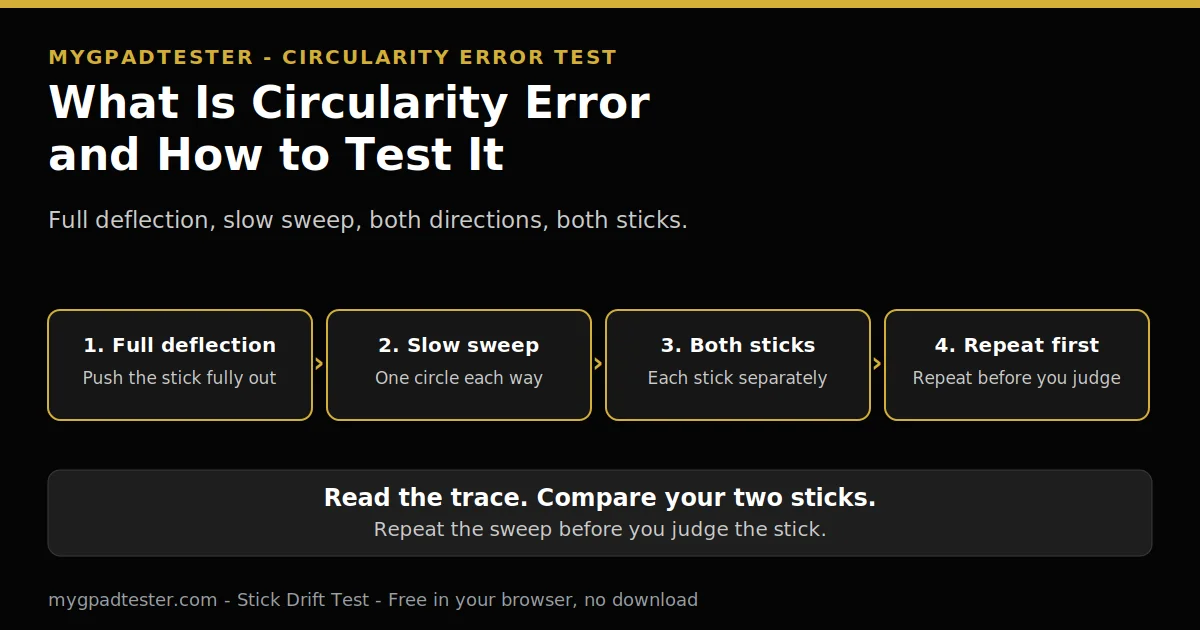
Circularity error is how far your stick trace strays from a perfect circle at full deflection. It is a full deflection test, not a rest test. Sweep slowly in a full circle, both directions, each stick separately, then read the result only after full coverage. Repeat the sweep before you judge the stick.
No download. No account. Data stays in your browser.
Circularity is a full deflection test. Drift is a rest test. The two tests measure different things, so a bad trace is not the same as drift. Start with the rest reading on the Stick Drift Test, then read this post for the full deflection reading. The deadzone post explains the setting that hides small movement, not the test itself.
What circularity error is, in plain words
Circularity error is how far your stick trace strays from a perfect circle at full deflection. The test reads the outer edge, so you must push the stick fully out and cover the whole circle before you read anything. A trace that stays close to a circle reads well. A trace that pulls in or flattens out reads worse.
The browser reads the stick on two axes, X and Y, from minus 1.0 to 1.0, Tier 1. At full deflection the reading sits at the outer edge. The trace is the path the reading draws as you sweep around that edge. Each reading carries a timestamp.
A perfect circle would mean the reading stays at the same distance from the centre all the way around. Real sticks rarely draw that. The gap between the trace and a perfect circle is the error.
The result is browser observed, via the Gamepad API, Tier 1 concept. It is for comparison and stability, not for certifying a hardware grade. Read it as a trace shape, not as a verdict on its own.
How to test it, step by step
Rest the stick, then push it to full deflection and sweep slowly in a full circle. Sweep one circle in one direction, then a second full circle the other way. Test each stick on its own. Read the result only after full coverage, then repeat the sweep before you judge anything. Allow about 15 minutes for the full run.
The 7 steps in order
Work the steps in order.
- Open the stick test in Chrome or Edge.
- Rest the stick untouched and check the resting reading first.
- Push the stick to full deflection.
- Sweep slowly and steadily in a full circle, one direction.
- Sweep a second full circle in the opposite direction.
- Repeat the sweep for the other stick, separately.
- Read the circularity result only after full coverage, then repeat the sweep before judging it.
How to test it, step by step
Total Time: 15 minutes
Open the stick test in Chrome or Edge.
Rest the stick untouched and check the resting reading first.
Push the stick to full deflection.
Sweep slowly and steadily in a full circle, one direction.
Sweep a second full circle in the opposite direction.
Repeat the sweep for the other stick, separately.
Read the circularity result only after full coverage, then repeat the sweep before judging it.
Test the left stick first, then the right stick, each on its own. Keep the controller flat and untouched for the rest reading, for 30 to 60 seconds. Record stick, direction, value, connection, and browser for each reading.
Chrome and Edge are reference browsers for testing. Firefox has basic support. Safari and mobile have limited support.
What a good or bad reading means, honestly
Sources disagree on scoring, so this post gives no band and no good number. Three reported systems use different scales, and they do not agree with each other. That is why one number cannot grade your stick on its own. Read the trace instead, compare your two sticks, and repeat before you judge it.
One reported system calls 6 to 9 percent the factory standard, Tier 3 at best. A second system scores out of 100, with 90 percent and above called excellent and below 65 percent called significant wear. A third system calls under 10 percent excellent and over 20 percent poor. The three systems disagree, so none of them is used here as fact.
Read the trace instead. Compare your two sticks with each other. Compare before and after one change only. Repeat the sweep before you judge the stick. A reading proves a trace shape, not a cause.
Circularity error is not stick drift
Drift is read at rest, with the stick untouched. Circularity is read at full deflection, with the stick pushed fully out and swept around the edge. The two tests measure different things, so a bad trace is not drift and drift is not a bad trace. Test each one the right way, and read each result on its own.
House drift scale, tester convention every time, never a vendor specification. Flickers within 0.02 to 0.03 is normal noise, no fix needed. A steady offset of 0.05 to 0.10, in the same direction, is measurable mild drift. A steady offset above 0.10, or creeping in one direction, is clear drift. Random jumps, even untouched, mean debris, a loose stick, or a failing sensor.
For mild drift, clean, calibrate, use a deadzone bridge, retest, and monitor. For clear drift, clean, calibrate, then decide repair versus replace.
Read what stick drift is for the rest test in full. That post owns the drift definition.
Does it mean my stick is worn out or damaged?
A trace shape alone does not prove wear or damage. It proves a shape, not a cause. The sensor inside the stick, the gate around it, and the sweep itself can each shape the trace. Before you call the stick worn out, check the sweep, compare the two sticks, and look at the rest reading too.
Most sticks use a potentiometer, Tier 2, from the iFixit Hall effect page. A potentiometer is a variable resistor that forms a variable voltage divider. Moving the stick moves a conductive wiper against a resistive contact pad, which varies the resistance and therefore the output voltage. The controller reads that voltage as a position. Two potentiometers per stick, one for X and one for Y.
The resistive contact pads wear down from friction, Tier 2, same iFixit source. Every stick movement removes a minuscule amount of material. Once the resistance value of the neutral position changes, the controller reads a different voltage than expected while stationary and interprets it as input. That is drift.
Hall effect sticks work differently, Tier 2, same iFixit source. The wiper is replaced by a magnet and the resistive strip by a flat conductor, a Hall element, sensitive to magnetic fields. As the stick moves, the sensor detects the magnetic field change and interprets it as movement. No physical contact in the sensing path, so no friction wear in the sensing path.
Even Hall effect sticks can develop drift from other causes, and calibration or mechanical issues can still occur. A weak centering spring is one more possible cause, Tier 3 only, typical and community reported, not iFixit documented. The test does not change with the sensor type. The sweep is the same either way.
What the result proves
- The trace shape at full deflection, on this run, in this browser, on this connection.
- A difference between your two sticks, when both are swept the same way.
- A change before and after one change, when nothing else changed.
What the result does not prove
- Wear, damage, or a fault, on its own.
- Which part inside the stick caused the shape.
- That the stick needs repair or replacement, from one sweep.
Why the trace is a rounded square
The gate around the stick shapes the trace. Many sticks sit in a square gate, so the trace follows the gate and comes back as a rounded square. That shape is the gate talking, not proof of wear. Repeat the sweep slowly first, and only then ask whether the stick itself is at fault.
The gate is the frame the stick moves in. A square gate has flat sides and corners, so the stick at full deflection follows them. That is why a rounded square is common, not rare.
The sensor response curve can also shape the trace. The curve is how the sensor turns stick position into a reading. A curve that reads differently near the diagonals and at max input can pull the trace in at the corners. This is reasoning from the shape, not a measured claim.
Repeat the sweep slowly before you blame the stick. A fast sweep cuts corners and flattens the trace. If the rounded square stays the same on a slow repeat, it points to the gate, not to your hand.
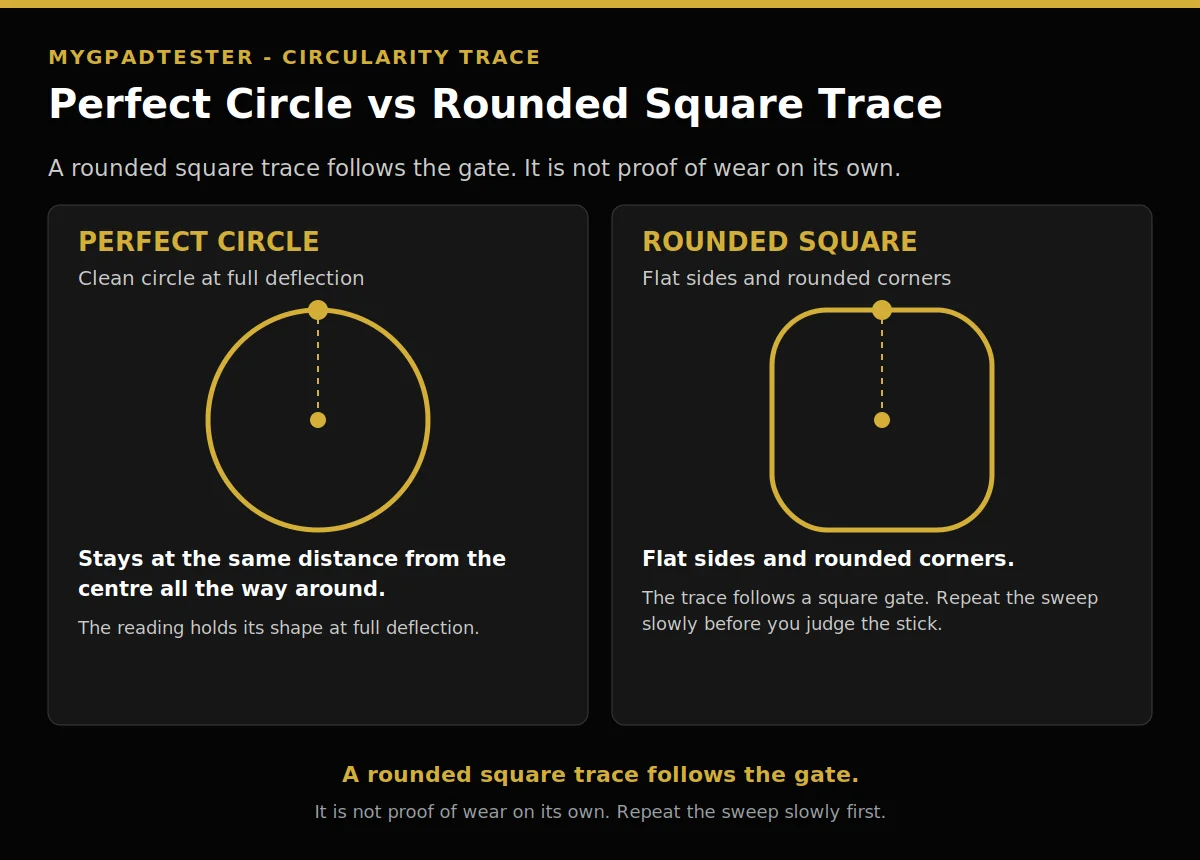
| Trace | What it looks like | What it means |
|---|---|---|
| Perfect circle | The trace stays at the same distance from the centre all the way around. | The reading holds its shape at full deflection. |
| Rounded square | The trace has flat sides and rounded corners. | The trace follows a square gate. Repeat the sweep slowly before you judge the stick. |
Why the score changes every run
The score changes because the sweep changes. Speed, coverage, direction, connection, and browser can each move the result. A fast sweep, a partial sweep, or a different browser gives a different number for the same stick. Change one variable at a time, then repeat the sweep before you judge the result.
Use the same reading in the same browser on the same connection before and after each change, one variable at a time. That is the retest rule. A number from a different browser or a different connection is not the same test.
Jitter shows in words only: wide, unstable, spikes and drops. If the reading jumps around, change one variable and retest. No percent threshold is used here for jitter. A jumping reading names the run, not the stick, until a repeat says otherwise.
Speed is the usual cause. A slow, steady sweep gives the most stable trace. A rushed sweep gives a different trace every time. Coverage is next. A partial sweep leaves part of the circle unread, so the result cannot be trusted.
Can calibration or deadzone fix it?
No. Deadzone hides a reading, it does not repair a stick. Calibration is a check, not a repair promise. Raising deadzone can hide the trace, but the stick underneath stays the same. Stop raising deadzone at 0.20, a tester guide, then decide repair versus replace.
Deadzone guides are tester guides every time, never vendor specifications. Start with resting plus 0.01 as a starting guide for a deadzone setting. Use outer 0.95 to 0.98 as a starting guide. Stop at 0.20, then move to repair versus replace. Deadzone hides drift, it does not repair drift. Set deadzone per stick separately. A deadzone setting is a bridge, not a fix.
Calibration is a check. Run it, then retest with the same browser and the same connection. If the trace stays the same after a clean, a calibration check, and a retest, the stick has not changed. Only the reading has been hidden or checked.
If the reading stays bad after a clean, a calibration check, and a retest, the next step is the repair versus replace decision. That decision belongs to the Repair vs Replace Decision Guide, named in text only here until its go-live check confirms it live (22 Nov row). Full deadzone settings live in the deadzone settings posts for FPS, Xbox, and PS5, named in text only here until their go-live check confirms them live (16 Nov row).
Does it affect aiming in games?
It affects full deflection actions, diagonals, and max-input actions, not small movements. Aiming uses small movements most of the time, so a bad trace may not show up in fine aim. It shows up when you push the stick fully out, hold a diagonal, or ask for max input.
A shooter is one example of a game where diagonals matter. Pushing the stick to a corner to move diagonally at full speed is a full deflection action. That is where a bad trace can show. Fine aim, with small stick movements near the centre, sits away from the outer edge.
A browser trace cannot grade your aim. It shows the trace shape at full deflection. Small movements, which aiming uses most, sit near the centre, not at the outer edge. Judge aim in play, not from one trace alone.
Controller health is a composite, not a single score. Read it as per-component pass or fail, for sticks, buttons, triggers, vibration, and connection. No single score is given for the whole controller.
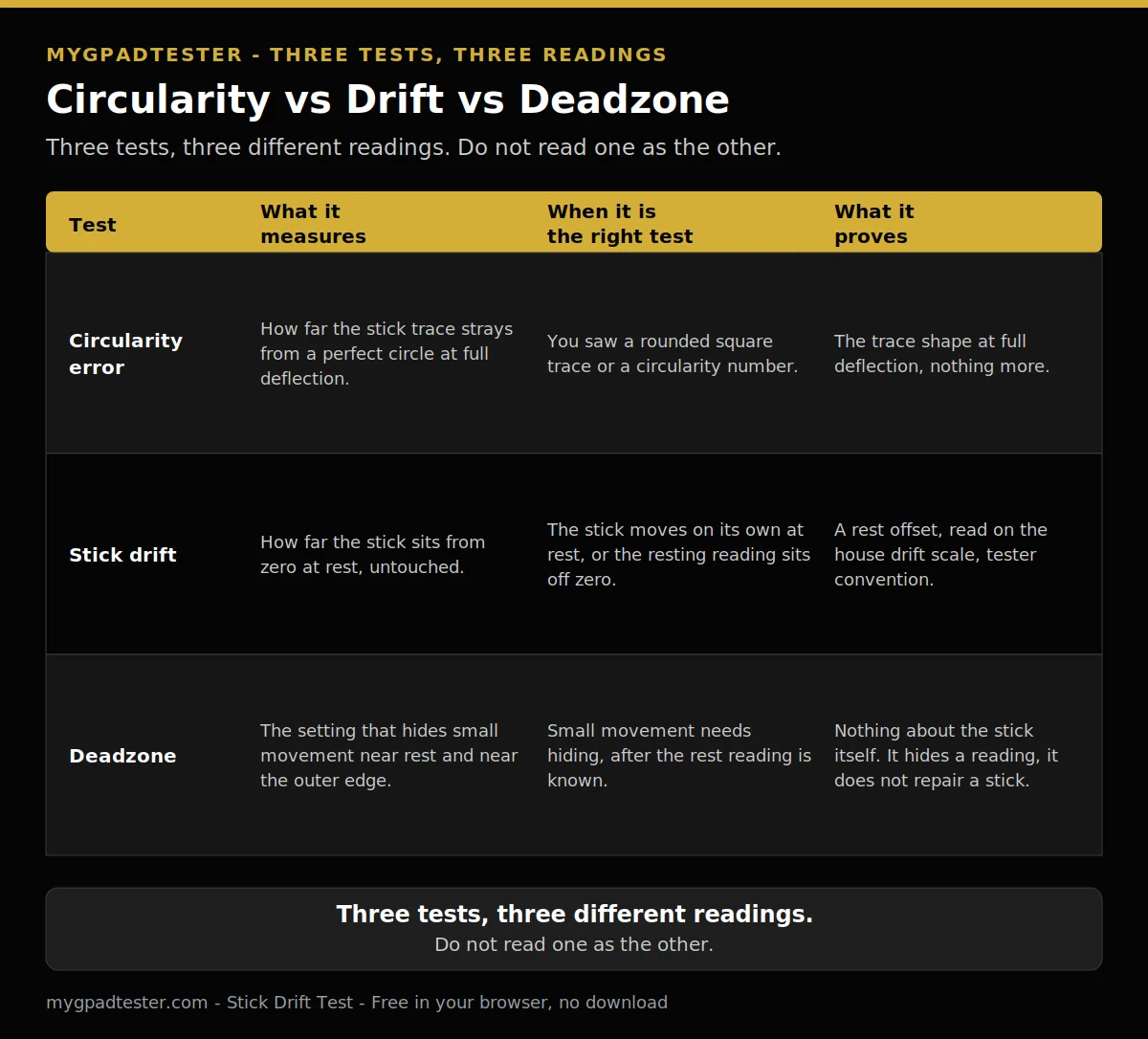
Three tests, three different readings
| Test | What it measures | When it is the right test | What it proves |
|---|---|---|---|
| Circularity error | How far the stick trace strays from a perfect circle at full deflection. | You saw a rounded square trace or a circularity number. | The trace shape at full deflection, nothing more. |
| Stick drift | How far the stick sits from zero at rest, untouched. | The stick moves on its own at rest, or the resting reading sits off zero. | A rest offset, read on the house drift scale, tester convention. |
| Deadzone | The setting that hides small movement near rest and near the outer edge. | Small movement needs hiding, after the rest reading is known. | Nothing about the stick itself. It hides a reading, it does not repair a stick. |
| Sweep factor | Good sweep | Bad sweep |
|---|---|---|
| Speed | Slow and steady, same pace all the way around. | Fast or rushed, pace changes mid-circle. |
| Coverage | Full circle, every part of the edge covered. | Partial circle, part of the edge never reached. |
| Direction | One full circle one way, then a second full circle the other way. | One direction only, or a half circle each way. |
| Sticks separately | Left stick first, then right stick, each on its own. | Both sticks at once, or one stick skipped. |
| Repeat rule | Repeat the sweep before you judge the stick. | Judge from one sweep, with no repeat. |
Before you judge the stick
- Full deflection, stick pushed fully out for the whole sweep.
- Slow, steady sweep, same pace all the way around.
- Two full rotations, one in each direction.
- Full coverage before reading, every part of the edge covered.
- Repeat the sweep before judging, and compare your two sticks.
Frequently Asked Questions
Do I test the left stick, the right stick, or both?
Both, each stick separately. Test the left stick first, then the right stick, each on its own. A reading from one stick says nothing about the other stick.
Does circularity error affect aiming in games?
It can, at full deflection. It affects full deflection actions, diagonals, and max-input actions, not small movements. Fine aim near the centre is the least affected part.
Is circularity error the same as stick drift?
No. Drift is read at rest, with the stick untouched. Circularity is read at full deflection, with the stick pushed fully out and swept around the edge. The two tests measure different things.
Can deadzone fix circularity error?
No. Deadzone hides a reading, it does not repair a stick. Raising deadzone can hide the trace, but the stick underneath stays the same. Stop at 0.20, a tester guide, then decide repair versus replace.
Why does my score change every time I run the test?
Sweep speed, coverage, direction, connection, and browser can each move the result. Change one variable at a time, then repeat the sweep before you judge the result. A fast or partial sweep is a bad test, not a bad stick.
What is a good circularity error number?
No band is given here, because sources disagree on scoring. One reported system calls 6 to 9 percent the factory standard, Tier 3 at best. A second scores out of 100, with 90 percent and above called excellent and below 65 percent called significant wear. A third calls under 10 percent excellent and over 20 percent poor. Read the trace, compare your two sticks, and repeat before you judge it.
Related Tools
- Polling Rate Test
- Vibration Test
- Trigger Test
- Stick Drift Test
- Stick Deadzone Test
- Button Test
- Input Lag Test
- Gamepad Health Checker
Related Guides
- What Is Controller Stick Drift?
- How to Test for Stick Drift Online
- What Is Controller Deadzone?
- Gamepad Not Detected by Browser? Fix It in 5 Minutes
- How to Test All Controller Buttons Online
- Gamepad API Explained.
- Best Deadzone Settings for FPS, Xbox Deadzone Settings, and PS5 Deadzone Settings, named in text only until their go-live check confirms them live (16 Nov row).
About the Author
Marcus Sterling, Lead Engineer and Founder of MyGpadTester, Austin, Texas. Profile: https://mygpadtester.com/marcus-sterling/ X: https://x.com/marcussterlin
Test in order, read the trace, repeat before you judge.
Run the rest reading first, then the slow full deflection sweep on each stick separately. Read the trace, compare your two sticks, and repeat before you judge the stick. A rounded square alone is not a verdict.
Next Steps
Retest with the same browser and the same connection after each change. Change one variable at a time, and record each reading with its stick, direction, value, connection, and browser. If a reading stays bad after a clean, a calibration check, and a retest, use the repair versus replace decision named in H2 8.